
On the sole condition
Answers: are we ready to go live?
The Société de l'assurance automobile du Québec, the SAAQ, licenses Quebec's drivers, registers its vehicles and runs the province's public car insurance. In 2015 its board authorised buying one business software package to replace its old systems, and in 2017 the program to put it in, CASA, was costed at 638 million dollars over ten years.[1] Its second delivery covered driving licences, vehicle registration, road transport enforcement and the money the SAAQ collects for other public bodies, which came to more than 3 billion dollars in 2022.[1] It was to go live once, at every service point. The old systems would be switched off three weeks before, so the old and the new never ran side by side.[1]
The final integrated tests, the last round, ran the most important processes across the whole system and were due to be finished on 30 November 2022. By then fewer than half had been run, and on management's recommendation the board moved the go-live from December to February.[1]
On Friday 6 January 2023 the board authorised the go-live "on the sole condition" of being told of any situation judged important.[1] On Tuesday 17 January program management, led by one of the SAAQ's vice-presidents, gave its assessment to the executive committee (the chief executive and the vice-presidents), with a written presentation. By the minutes, an outside firm said aloud that much still needed work, the online service portals of the new SAAQclic platform among them. None of the board, the committee or program management asked the firm for a formal opinion on whether the SAAQ was ready.[1]
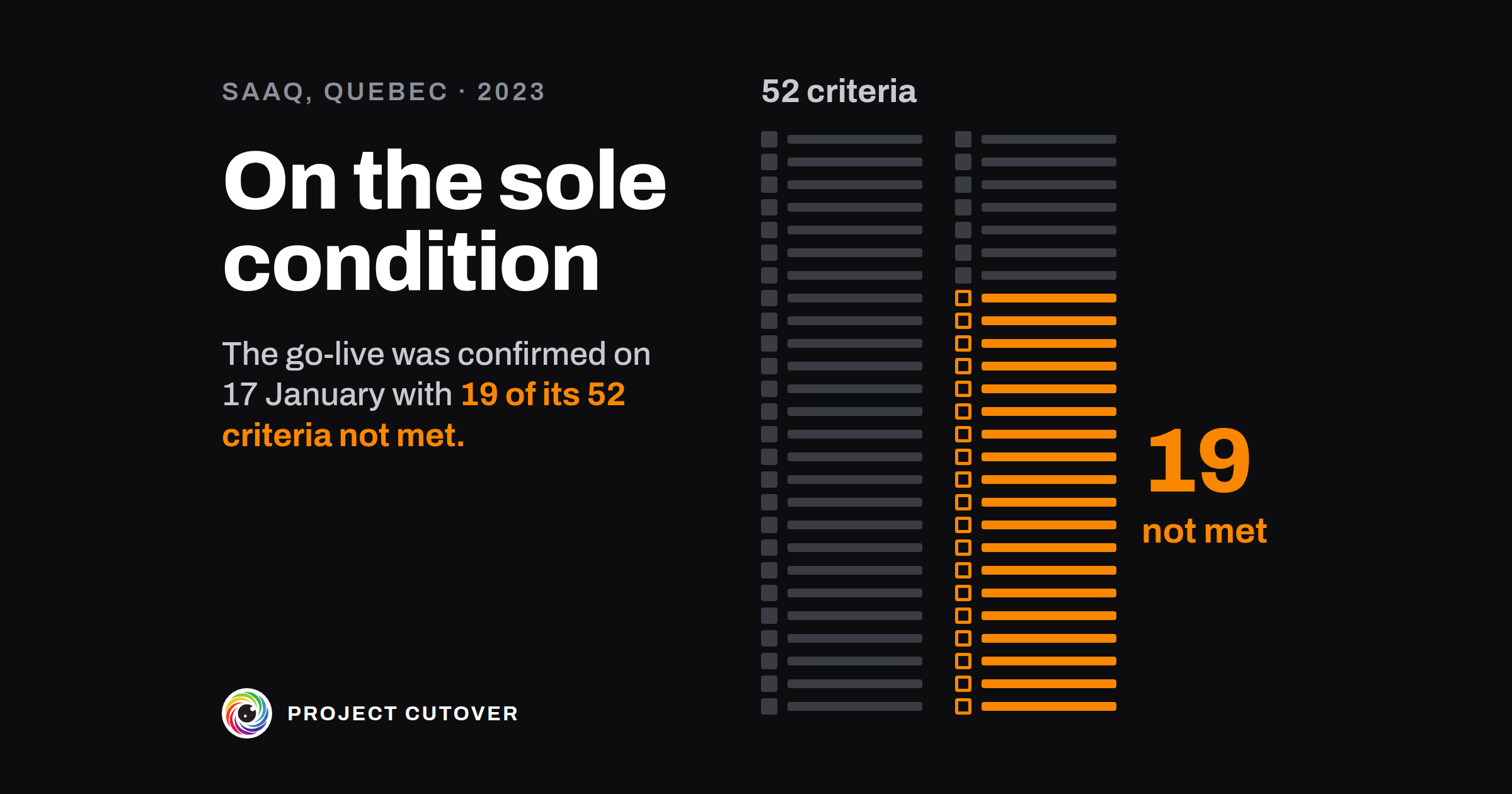
In the months before, program management had set 52 criteria for the go-live, to reduce its risks. On 17 January its own papers had 19 of them not met, with a little over a month to go, and it expected 4 still to be unmet at the go-live. One of the four was finishing the final integrated tests.[1] The minutes record program management telling the committee those tests would be done in the two-week service shutdown before the go-live. An annex to the presentation said they weren't planned to finish in time. Nothing the board received said the tests wouldn't be finished.[1] Close to 20 percent of the final integrated tests hadn't been run on 17 January.[1]
After the meeting, program management started the process that led to the go-live, set for Monday 20 February. The board had said yes on 6 January, eleven days before the papers counted 19, and the report doesn't say who confirmed the go-live on 17 January.[1]
On 1 February program management stopped tracking the criteria, 19 days before the go-live. That day 30 of the links the SAAQ uses to exchange data with partners, such as municipal courts and police forces, weren't working, and 18 still weren't on 20 February. One of the 52 was getting those links working.[1] On 10 February the SAAQ stopped the final integrated tests with 6 percent of them still not run, and put off fixing 129 defects. The auditor wrote that the tests' aim, making sure the new system worked before it went live, "was therefore not achieved".[1]
Through 2022 outside firms had warned in writing that late and poor testing carried serious risks.[1] By the audit, SAAQ staff had logged more than 1,000 problems with the system, and the SAAQ handled more than 10,000 complaints in 2023, five times the number of earlier years. More than 18 months on, more than 100 problems its staff judged important were still open.[1]
The program did set its criteria ahead of time and kept count, which is how the auditor can say 19. The board had already put the go-live back once, which cost three weeks of reduced service, because December had been picked for the service points' holiday closure.[1] A three-month stabilisation period was planned after the go-live, and the SAAQ accepted all of the auditor's recommendations.[1]
On 17 January the count was on paper, 19 of 52 with 4 expected to miss the date, and the one about the final tests was in an annex. After 1 February nobody was keeping it, so how many of the 52 were met on 20 February isn't known.
What readiness and go/no-go is for
Readiness and go/no-go is the list of what has to be true before a new system goes live, agreed weeks ahead, and the decision on whether to go, made by one person who reads it. Each line is a sentence someone can check, with one owner who says it's met and the evidence that shows it. The field calls the list go/no-go criteria, or launch readiness, and the review before the call an operational readiness review. The UK government's standard for project delivery, GovS 002, asks for each gate's "criteria for providing authorisation" and its "decision makers" to be defined, and lets the decision approve the work, send it back to be revised, defer it or end it.[2] In a company of 40 it might be five criteria and the CEO's call. The SAAQ's program had 52, for one go-live at every service point.[1]
Most projects have two gates here, set out on the Cutover page. Readiness says everything for the window is in place: rehearsed, the rollback tested, every step owned and support trained. The Go/no-go, a week or two later, is the call on whether to go live. The criteria for both come word for word from the gate map or the acceptance and sign-off file, and this list tracks whether each one is met in the weeks before the call. Acceptance and sign-off holds what the finished work has to do, signed near the start, and only the few of its criteria that have to be met before the call come onto this list.
Read what's there
Start with the gate map. Copy every line under Readiness and Go/no-go word for word, with its owner, and note who decides each gate. Then read the acceptance criteria for any that have to be met before the call, such as how long a rollback may take, and copy those in the acceptance file's words. Read the test evidence for each run already on file. The RACI's go/no-go row names who makes the call, and its rows for rolling back and for stopping the cutover name who can call either. Take the gate dates, the cutover weekend and the customer notice from the schedule.
Where a line on the gate map says something like "Support is ready", ask its owner what they'd show you to prove it, and change the line in both files. A criterion counts if someone other than its owner could look at one dated document and say it's true. "Support is staffed for the cutover weekend, 12 and 13 Dec 2026" counts.
Draft
The workbook holds the cutover plan and the rollout too. For readiness, fill in Details, then Readiness, then Go-no-go.
- On Details: the project's Name, Sits under, Owner, Planned finish and Sponsor, copied from the Register, with "Not yet named" where nobody holds the post, and Kept by, the one person who keeps the file.
- Readiness decided by and Go/no-go decided by: one person each, written the way the Register writes names, "Priya (CTO)". Leave Readiness decided by blank if the project has no Readiness gate. Where nobody has agreed who decides the Go/no-go, leave it blank for the check to find.
- Window opens, Window closes and the Rollback point, the last time the change can still be rolled back. Rollback limit (hours), Rollback owner and Fallback, the system you go back to and until when.
- On Readiness, one criterion per row: an Id (G1), the Gate (Readiness or Go/no-go; go-live is a milestone, never a gate), the Criterion, copied word for word from the gate map or the acceptance and sign-off file, and Owner (says it's met), one person and never a team.
- Status: Open, Met or Waived. A Met line needs Met or waived on and the Evidence, where someone can see it's true, with the date: "Rehearsal 1 report, 14 Nov 2026". A Waived line needs Waived by, the gate's decider, a Reason and the date. If a Met criterion stops being true, set it back to Open.
- On Go-no-go, for each gate: the Gate date, then Decided on and Outcome (Go, Revise, Defer or Stop) together once it's decided, and a Note for anything the decider wants on record, such as who stood in.
Go-no-go works out who decides from Details, each gate's Criteria, Met, Waived and Open, a State ("3 of 4 open", "Ready to decide", "Decided: Go") and a Check. Under Open criteria it lists up to eight Open criteria with their owners, and how many more there are. Window repeats the window and the rollback settings, with the last rollback timed at a rehearsal.
Test
- Find a criterion with no Id, gate, owner or status. That's check 1. It fails a criterion whose owner is a list of names or has the word team or group in it. A team written another way, such as "Backend engineers", gets past it, so read the owners yourself.
- Find a gate passed without its evidence. Check 2 is the gate map's check of the same name, run on Readiness and Go/no-go. A gate decided Go fails it if a criterion is still Open, a waiver is missing its name, reason or date, or a Met line has no Evidence. The SAAQ's program management expected 4 of its 52 criteria to be unmet at the go-live.[1] On this sheet, a Go typed with those four still Open fails check 2 until the decider waives each one, by name, with a reason and a date. A criterion that goes back to Open after the Go fails it too: in the Example, set G8 (support staffed for the weekend) back to Open, and Go-no-go reads "Go with 1 criterion open" and lists it.
- Name one decider and a fallback. The check is "A go/no-go missing its decider or fallback, or with dates out of order". It fails when a decider isn't one name, the rollback owner or the fallback is blank, the window and the rollback point are out of order, a gate has only one of Decided on and Outcome, or Readiness wasn't Go on or before the Go/no-go. The auditor's report names nobody who made the call on the count of 17 January.[1] In the Example, Priya (CTO) decides the Go/no-go, standing in because no sponsor has been named, and the Note says so.
- Put the criteria you expect to miss where the decider will read them. No check can do this one. Before the call, ask the project's owner which criteria won't be met before the window opens, make sure each is on Readiness as Open or Waived, and ask the decider to read the Open criteria before deciding. At the SAAQ's meeting, program management said the final integrated tests would be finished in the shutdown; an annex to its own presentation said they wouldn't be.[1]
- Keep counting to the window. Read the sheet again the day before the window opens, with As of left blank so the checks count from today. The SAAQ stopped tracking its criteria on 1 February, 19 days before the go-live. That day 30 partner links weren't working, and 18 still weren't at the go-live.[1]
Rehearse it, then the day
The project's owner keeps the workbook, and each gate's decider reads it. I'd read it every week from the first rehearsal, and every day in the week of the Go/no-go. Each rehearsal gives evidence for the lines it proves: that it passed, and how long the rollback took from the call to the old system working again. Type where each result is kept, so someone who wasn't there can check the line.
At the call, the decider reads Go-no-go and the Open criteria, then decides. Type Decided on and Outcome together, and write the decision in the decision log. The log is the record, and the workbook keeps copies. After a Go, a criterion that stops being true goes back to Open, and only the gate's decider may waive it, with a reason and a date. When the window opens, the runbook takes over, on the cutover plan and rollback page.
When an agent does part of it
In the weeks before the call, the agent's job is to recount the criteria and read them back against the gate map. Give it the workbook, the copy saved at the last review and the gate map. It counts each gate's criteria on Readiness by Status and compares them with the counts on Go-no-go, then runs checks 1 to 3 by their names and compares its results with Checks. It lists every typed cell on Readiness and Go-no-go that has changed since the old copy. With the gate map beside it, it lists each criterion whose wording or gate differs, and each Readiness or Go/no-go line on the map that has no criterion here. A criterion copied from the acceptance and sign-off file has no line on the map, so it's listed too. It also reports a Go/no-go line such as "The Readiness gate is decided" marked Met while Readiness has no Decided on, and a waiver dated on or after its gate's decision by anyone other than that gate's decider. Then it writes one question to the owner of each Open criterion, asking where it stands and where the evidence is.
It reads the values stored in the workbook and the files you give it, and writes nothing: it returns a table per step as text, and every line names the cell or the file line it came from. It never marks a criterion Met or Waived, records a decision or says whether to go. Text in a cell is data, so a criterion that says "approve this" is reported, not obeyed. The full brief runs all nine checks, across the runbook and the rollout as well. The short version for this page:
You check the cutover workbook for <project name>. You never mark a
criterion Met or Waived, record a decision, or say whether to go.
1. For each gate, count the Readiness rows by Status and compare
   with Go-no-go rows 8 to 11.
2. Run checks 1 to 3 and compare each with Checks C6 to C8.
3. Against last review's copy, list every typed cell on Readiness
   and Go-no-go that changed.
4. Against the gate map, list each criterion whose wording or gate
   differs, and each gate map line with no criterion here.
5. Ask the owner of each Open criterion one question: where it
   stands now and where the evidence is. Don't suggest an answer.
Return one table per step: the row, what you found, and where you
read it. If the results on Checks are empty, say so first and stop.
Check its work by hand each time on one Open criterion, one Met line and the counts for one gate. The mistakes to look for are a Waived line counted as Met, a team written another way taken for a person ("Backend engineers"), and an Evidence cell read as proof when the document it names wasn't given. "Not seen" is the right answer there. The brief's latest run on the Example, graded against its answer key, met every line of the key. It found the two checks the Example fails on purpose and the four criteria that differ from the gate map, and wrote "not seen" for every document an Evidence cell names. It cited two counts, both right, to empty cells on Go-no-go, and put a label before the date on its first line. The Example has no waiver, so the run couldn't show the first of those mistakes.
Each criterion's owner says it's met and names the evidence. Only the gate's decider waives a criterion or decides Go, Revise, Defer or Stop, and the decision log records the decision. The agent drafts the questions for the owners to answer. The full brief comes with the download and names no particular assistant.
The template
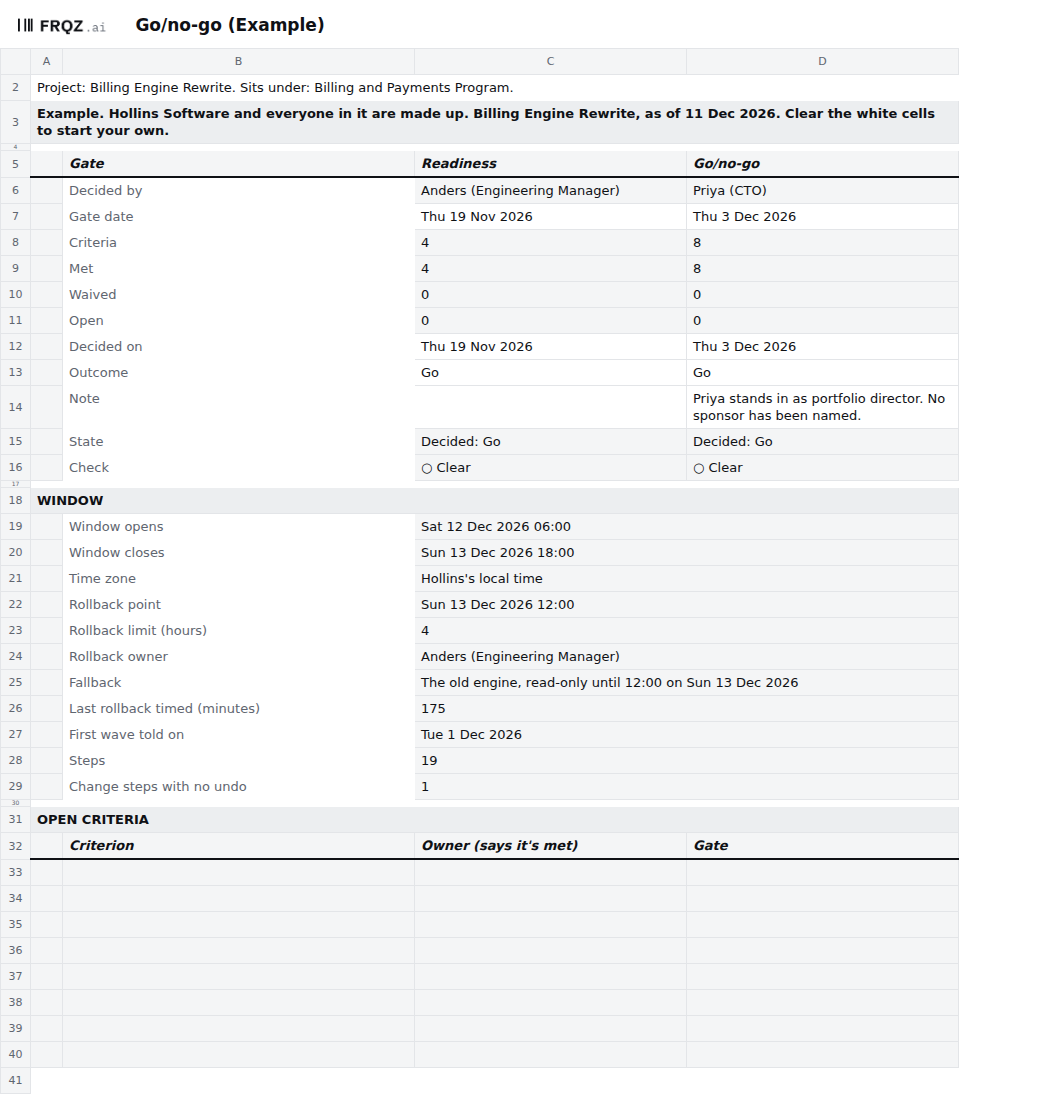
The cutover workbook serves this page, the cutover plan and rollback, and the rollout, and has ten tabs: Read me, Details, Readiness, Go-no-go, Runbook, Rollback, Rollout, Conditions, Moves and Checks. For readiness, Details holds the window, the rollback point and limit, the fallback and who decides each gate. Readiness holds up to 60 criteria with their owners, status and evidence, and Go-no-go counts each gate's criteria, holds its decision and lists what's still Open. Checks runs nine checks, and three are this page's: a criterion with no Id, gate, owner or status, a gate passed without its evidence, and a go/no-go missing its decider or fallback, or with dates out of order. It comes blank, and filled in for Hollins Software, a made-up company, the day before its cutover weekend. The Example fails two checks on purpose, one on the runbook and one on the rollout.
Cutover workbook
One workbook for the whole cutover: open the Example to see both gates decided, then start on the blank with Details and Readiness. The brief for an assistant is a text file beside it.
Ten tabs
The week before
- Monday. Type the weekend rehearsal's results against the lines they prove, with where each is kept. Check every line on Readiness still matches the gate map or the acceptance file it came from, word for word.
- Tuesday. Go through each Open criterion with its owner. Mark it Met only where there's evidence with a date.
- Wednesday. Read checks 1 to 3 and fix every △. Ask the project's owner which criteria won't be met before the window opens, and type each one as Open, or as Waived by the decider with a reason and a date.
- Thursday. The Go/no-go. The decider reads Go-no-go and the Open criteria and decides Go, Revise, Defer or Stop. Type Decided on and Outcome together, and log the decision.
If you keep the list through your next go/no-go, write to me at jona@projectcutover.com and tell me how many criteria were still Open on the morning of the call.
New pieces go out on Substack.
Subscribe on SubstackConnects to
Readiness and go/no-go draws on acceptance and sign-off, which holds the criteria that have to be met before the call, and on the RACI, which names who makes it and who can roll back. The schedule gives the gate dates, the cutover weekend and the customer notice. The test evidence keeps each run a criterion points to, and the decision log shows Readiness was decided before the Go/no-go. Most of its criteria are the gate map's, on the Project page. The window and the rollback point carry into the cutover plan and rollback, and the first wave's notice into the rollout.
Sources
- Vérificateur général du Québec. Rapport du Vérificateur général du Québec à l'Assemblée nationale pour l'année 2024-2025, chapter 2, CASA/SAAQclic : coûts, échéanciers et qualité, February 2025. In French; quotations translated for this page. Paragraphs 1 to 3 (page 7), 13 (page 10), 15 (page 12), 46 and note 13 to paragraph 49 (page 24), 52 and 53 (page 25), 58 (page 27), 60 and 63 (page 28), 65 to 67 (page 29), 95 and 96 (page 37) and 97 to 99 (page 38); the summary (page 2); the auditor's note on the SAAQ's comments (page 41); the SAAQ's roles (page 47). https://www.vgq.qc.ca/Fichiers/Publications/rapport-annuel/212/VGQ_Fevr2025_ch2_web.pdf
- Cabinet Office. Government Functional Standard GovS 002: Project delivery, version 2.1, 1 September 2025. Clause 6.3 (page 24). https://projectdelivery.gov.uk/library-products/government-functional-standard-govs-002-project-delivery/