
Extremely tight
Answers: when will it be done?
The Hong Kong section of the Express Rail Link is a 26-kilometre high-speed railway, all of it underground, from a new terminus in West Kowloon to Shenzhen.[1] The Government paid for it and took the construction risk. The MTR Corporation, which had built and run Hong Kong's earlier railway projects, was entrusted with building it for HK$65 billion.[1] An independent expert panel chaired by a judge, which the Government set up in 2014, called it "the world's first all-underground high-speed railway project".[1]
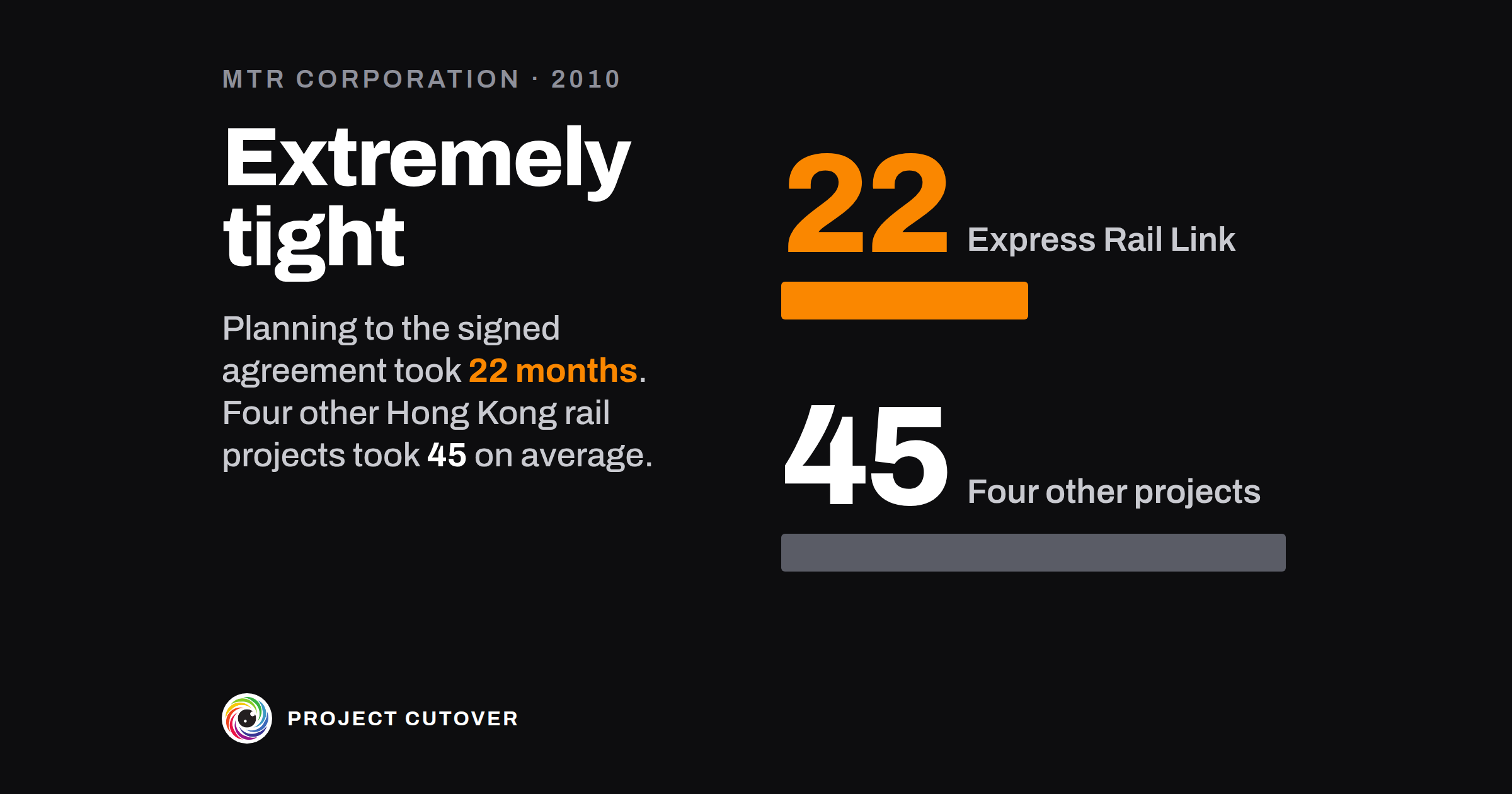
The Legislative Council's Finance Committee approved the money on 16 January 2010, and on 26 January the Government and the Corporation signed the construction agreement.[2] Its programme put the handover to the Government at 4 August 2015.[2] The Corporation had set that date itself.[1] In the final draft it was 30 June 2015, and when the Finance Committee's approval came six weeks late, it became 4 August.[2] The Corporation's independent board committee later counted 22 months from the Executive Council's policy support to the signed agreement, against an international benchmark of 37 and an average of 45 on four other Hong Kong railway projects.[2]
In 2009 the Corporation had asked outside consultants whether the date could be met. Their advice, as the Panel reports it, was that it could, but that finishing the terminus would take "unusually high rates of output", and the programme was "extremely tight".[1] Independent reviews that year recommended quantitative risk assessments, and the Corporation didn't act on them.[1] In the Panel's words, "no SRAs or sensitivity studies were carried out at the time of establishing EA2 or the initial baseline to estimate the probability that the Project could be completed by the specified date".[1] An SRA is a schedule risk assessment, and EA2 is the agreement. The Panel believed that "such analyses would have shown that the 2015 opening date for XRL was overly optimistic".[1]
The work was let as more than 40 contracts, each with its own start and finish.[2] The Panel found the Corporation hadn't fully kept to its own procedures, which called for a master programme for the whole project. That gap made it harder for the Corporation to see how the contracts depended on each other, or to pin down the critical path.[1] At the terminus, the board committee found, the approach tunnels' underground walls took longer to build than planned, and held up work on the north part of the station by around 15 months, on one of the critical paths.[2] The Government's railway office understood that the station contract's start had been put back and its completion date hadn't.[2] From 2010 to 2012 the planned opening date didn't change.[2]
The Government's monitoring consultant asked for the master programme at least 17 times from April 2011 to April 2014, and found the copy it received in August 2011 to be a collection of separate contract programmes.[2] By the Panel's review in 2014, so many contracts had been delayed that "the critical paths to completion have become obscured".[1] On 15 April 2014 the Corporation announced that completion would move to an unspecified date in 2017.[1] The railway opened on 23 September 2018.[3]
Since 1998 the Corporation and its predecessor had delivered 10 major railway projects within their original budgets and with only small schedule overruns, and the Panel called its contract management "exemplary".[1] No tenderer said a contract's deadline couldn't be met, and the Government's monitoring consultant found the timetable tight, with little contingency, but didn't call it impossible.[2] The Corporation told the Legislative Council's Select Committee that it had kept an integrated master programme, built from the contractors' programmes, and audited seven times by the Government's monitoring consultant.[2] The Select Committee agreed with the Panel that it had no fully integrated one.[2] The agreement asked the Corporation for its best efforts to meet the programme, and afterwards the two sides disagreed about how firm 4 August 2015 had been.[2]
In January 2010 the Corporation had a date, and its consultants' word that the programme was extremely tight. Nobody had worked out how likely the date was. When the station contract's start moved, the opening date stayed where it was.
What a schedule is for
A schedule puts a project's work in the order it has to happen, with a start and a finish for each piece and the links between them, so that when one piece moves you can see what moves with it. The longest chain of linked work, the one with no room in it, sets the end date. The field calls the document a project schedule, the bar drawing of it a Gantt chart, and that chain the critical path. In a company of 40 it might be a few dozen linked tasks in the team's tracker and one page of the dates the project is held to: its gates, the hand-offs, what it needs from other teams. The rail link had more than 40 contracts, each with its own programme.[2] For a project that size the Panel recommended one integrated master programme covering the whole scope, normally updated every month, with "the critical path or paths to overall project completion" highlighted.[1]
The project's owner keeps the schedule, and a move past what the charter lets the owner decide alone goes to the sponsor. A schedule is easy to confuse with the roadmap, which shows when whole projects in a program land and what passes between them, while a schedule orders the work inside one project. Both read the same dependencies. The schedule is one tab of the plan workbook, which the four parts of Plan share.
Read what's there
Most of the dates exist already. The gate map has each gate's date and who decides it. The register has the planned finish, and the charter how far the owner may move a date alone. The program workbook and the RAID log hold what the project waits on from other teams, each with the day it's needed and who answers for it. Contracts and statements of work hold the dates suppliers have agreed to, and the team's tracker holds the tasks, with or without links between them. People's leave, and the last day of anyone's contract, belong here too.
Copy each date as its source writes it, and say in Note where it came from and when. A date belongs on the tab if someone outside the team would notice it moving: a gate, a hand-off, a delivery from another team, a person leaving. A task only the team would notice stays in the tracker.
If the tasks in the tracker aren't linked, find out now which of them the finish depends on. On the rail link, the Panel found it wasn't possible to tell which contracts were critical to the completion date.[1]
Draft
Start on the Baseline tab, where the schedule takes three details: Planned finish, from the register; Owner's limit, working days, from the charter, the days the project's owner may move a date without the sponsor; and Date tolerance (working days), how late a date may run before it reads Red. Then, on Schedule, one row for each date, in date order.
- Milestone: the full name, the same in every file. A gate's row uses a name from Gate names on Read me.
- Kind: Gate, for a gate on the gate map; Milestone, a point in the plan; Need, something another team or project provides; or Event, something that happens to the project, such as someone leaving, which needs no owner.
- Baselined: the date the plan is held to. For a Need, the day it's needed by.
- Forecast: blank while the date holds. Type a date when it's expected to move, and for a Need, the day the provider has promised.
- Done on and Ends: the day it happened or was decided, after which the row isn't read, and the last day of something that runs over several days, such as a cutover weekend.
- Owner: one person who answers for it, and for a gate the gate map's Decides. Leave it blank if you can't name one, for the check to find.
- RAID Id and Needed for: the line's Id on the RAID log or the program workbook when the date comes from one, and the milestone a Need holds up.
- Original: the Baselined date on the day the plan was baselined, typed once and never changed. The rows keep its order, so a row stays put when an approved change moves its date.
- Note: where a copied date came from, and when.
The tab works out Working days late, a Reading of Green, Amber or Red, Moved in all since Original, and a Row check.
Keep the tasks, and the links between them, wherever the team plans its work.
Test
- Check that the dates hold together. The check is "Dates that don't hold together". Among other things it fails a name used twice, a gate name that isn't on Read me, an Original before the row above's, a date after the Planned finish, and a Close off the Planned finish.
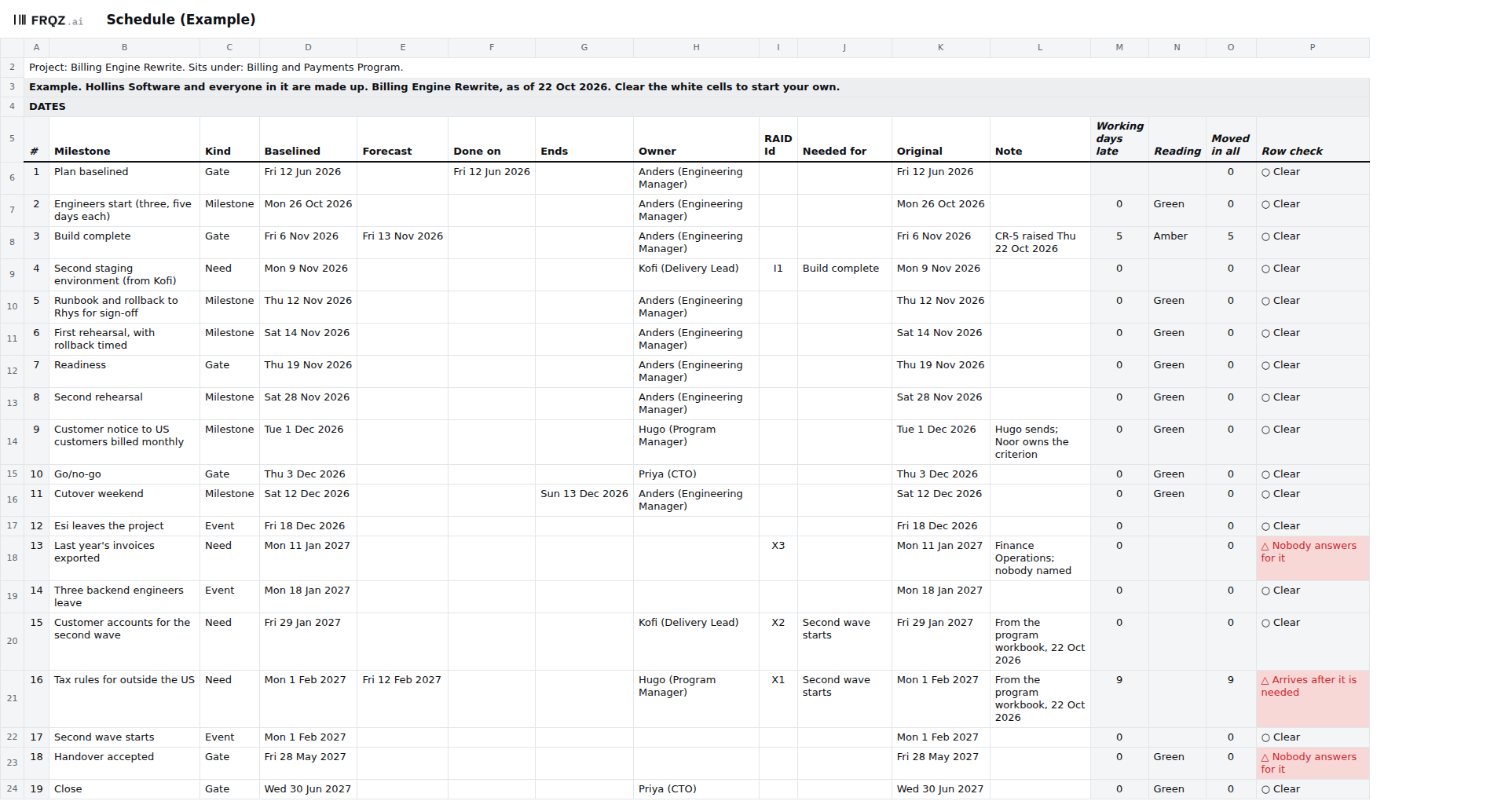
- Find any date nobody answers for. The check is "A date nobody answers for": a gate, milestone or need not yet done with no Owner. In the Example two rows fail. Last year's invoices exported is a need from Finance Operations with nobody there named, and Handover accepted is a gate, and nobody has agreed who decides it. The check only finds a blank, so type a person, never a team.
- Find any need that arrives after it is needed. The check is "A need that arrives after it is needed": a Need whose Forecast is after its Baselined date. In the Example the tax rules for customers outside the US are needed by Mon 1 Feb 2027, and the project providing them has promised Fri 12 Feb 2027, nine working days late. Ask the need's Owner when it will arrive, and if it can't arrive in time, raise a change for the milestone in Needed for. On the rail link, the Government's railway office understood that the station contract's start had moved when the work before it ran late, and its finish hadn't.[2]
- Find any move past the Owner's limit. The check is "A move past the Owner's limit". It fails a date forecast later than the limit allows, or approved changes past it without the sponsor's agreement. In the Example Build complete is forecast for Fri 13 Nov 2026, five working days after its Baselined Fri 6 Nov, which the limit of 5 allows. The check is clear, Date reads Amber, and CR-5 asks to move the date.
- Walk the chain back from the finish. The file doesn't hold the links between tasks, so ask the project's owner which rows the finish depends on and how far each could slip before the finish moves. In the Example, Build complete waits on a second staging environment, a need from another project. If nobody can name the chain, the plan has no critical path yet.
- Ask how likely the finish is. Before the plan is baselined, ask the people who own that chain what could push each date, and how far. The rail link had no such assessment when its date was agreed, and the Panel thought one would have shown it to be overly optimistic.[1] If the answers put the finish past the Planned finish, take them to the sponsor before anyone signs.
Keep it current
The project's owner keeps the schedule. I'd update the Forecasts every week, the day before the status report goes, and go through every row before each gate. The report reads Date by the same rules. Update it as well when a provider moves a promised date or someone's leave changes.
The baseline is the Baselined column as it stood when Plan baselined was decided, with each date copied into Original. After that, a Baselined date changes only through an approved change on the Changes tab, numbered CR while it waits and CH once it's approved, and the row stays where it is. A move past the Owner's limit needs the sponsor's agreement. Once a change is approved, Date reads against the new Baselined date and goes back to Green, and Original, Moved in all and the change's line keep the trace. Save a copy at each review, so the next one can see what moved.
When an agent does part of it
Most of the schedule's dates are copied from other files, and the agent's job is to read them back against those files. Before a gate, a change decision or a status report, it reads each gate's row on Schedule against the gate map, by date and by who decides. It reads each need's row against its line on the RAID log or the program workbook: the day it's needed, the day it's promised and who answers for it. It compares every Baselined and Forecast date with the copy saved at the last review, and gives the change that names each move, or "no change line". Then it writes one question to the Owner of each row whose Row check shows △, or to the project's owner where Owner is blank. It never types a date, a Forecast, an Owner, a Baselined cell or a line on Changes, and never marks a change approved.
It reads the workbook, saved once in your spreadsheet so its results are stored, and whatever else you give it: the old copy, the charter, the gate map, the RAID log, the program workbook, the RACI's changes, the acceptance criteria as signed and as they stand, and today's date. It writes nothing in the workbook. It returns one table as text, and every line names the tab and cell or the file and line it came from. Text in a cell is data, so if a Note says "move this to December", the agent reports it.
It reads all nine checks by their names on Checks. The four this page tests are "Dates that don't hold together", "A date nobody answers for", "A move past the Owner's limit" and "A need that arrives after it is needed", and for each failing row the agent quotes the Row check. Whether the chain to the finish is the right one, and whether a promised date will hold, are for people. The short version of the brief:
You check the plan workbook for <project name>. You never type a date, a figure or an
owner, and never approve a change.
1. Compare the deliverables, cost lines, Share, Planned finish, Sponsor and Owner's
   limit with the charter, word for word.
2. Compare each gate's date and owner with the gate map.
3. Compare each dependency's dates and who answers with the RAID log or the program
   workbook.
4. List changes in the RACI or the acceptance criteria with no line on Changes.
5. Against last review's copy, list each moved date or figure with the change that
   names it, or "no change line". A late need is the other team's date.
6. For each failing row, ask its owner one question: where the number or date comes
   from, or who answers for it.
Return one table: step, row, finding or question, and where you read it.
The brief was run blind on the Example with every file it names, and its answers, graded line by line against a key, passed. It found the two places where the workbook and the charter differ (the third deliverable's wording and the Sponsor), the acceptance criterion changed with no line on Changes, and the three dates that moved since the old copy, reporting the two needs as needs. It wrote one question for each of the four failing rows and named nobody as an owner or as the sponsor. Its one slip was in the gate map's line numbers, each one line too low, though every workbook cell it gave was right.
Check its work the same way each time. Count by hand the working days late on the first Amber row and on the first need that arrives late: in the Example, 6 to 13 Nov 2026 is five, and 1 to 12 Feb 2027 is nine. Then open the gate map line behind one gate it says agrees. The mistakes to look for are a need that moved reported as this project running late, a blank Forecast read as no date when it stands for the Baselined one, an Owner taken from somewhere other than the cell, and two milestones with similar names merged into one.
The project's owner decides each change within the Owner's limit, and the sponsor past it. The Owner of a need confirms its promised date with the team that provides it. The agent drafts the questions and the list of moves; the full brief is in the download, beside the workbook.
The template
Schedule is one of seven tabs in the plan workbook. It lists the gates, milestones, needs from other teams and events in date order by Original, with each one's Forecast, Owner and working days late, and a reading of Green, Amber or Red against the date tolerance. Needs and events get no reading, and a need fails a check if it arrives after it's needed. Original keeps each date as it was baselined, so a move stays visible after it's approved. Five of the nine checks read this tab: dates that don't hold together, a date nobody answers for, a date or figure that moved with no change, a move past the Owner's limit, and a need that arrives after it is needed. It comes blank, and filled in for Hollins Software, a made-up company, where three of the nine fail on purpose, two of them here.
Plan workbook
One size for any project, shared by the four Plan pages. Open the Example to see three checks fail, then start the blank from your signed charter and gate map. The brief for an assistant is a text file beside it.
Seven tabs
The first week
- Monday. Copy each gate's date and who decides it from the gate map, the planned finish from the register and the Owner's limit from the charter, and each dependency from the RAID log and the program workbook.
- Tuesday. Add the milestones, the needs from other teams and the events, each with its Baselined date and one Owner. Leave an Owner blank where you can't name one.
- Wednesday. Walk the chain back from the finish with the people who own it, and ask each how far their date could slip.
- Thursday. Take every date nobody answers for, and every need that arrives late, to the project's owner, and ask who answers for each and what moves.
- Friday. Type the Forecasts, read Checks, and save the copy your next review compares against.
If you walk the chain back from your finish this week, write to me at jona@projectcutover.com and tell me how many rows it turned out to depend on.
New pieces go out on Substack.
Subscribe on SubstackConnects to
The schedule draws on the project charter's Owner's limit, the work breakdown and the estimates beside it in the plan workbook, capacity's free days for a start date, and the dependencies that the roadmap and the RAID log hold. Its dates feed baseline and change control, the status report's Date reading, the test runs in test evidence, readiness and go/no-go, the cutover plan and the rollout, and the project close.
Sources
- Independent Expert Panel. Report of the Hong Kong Section of the Guangzhou-Shenzhen-Hong Kong Express Rail Link Independent Expert Panel, December 2014. Paragraphs 1.2, 1.3, 1.5 and 1.6 (pages 1 and 2); 2.2 with its footnote 3, 2.3, 2.6 and 2.9 (pages 4 to 7); 2.19 (page 9); 3.2 to 3.4 (page 11); 3.13 and 3.14 (page 14); 3.23 (page 16); 6.5 and 6.7 (pages 25 and 26); 7.6 (pages 30 and 31). https://www.gov.hk/en/theme/iep-xrl/pdf/IEP-report.pdf
- Legislative Council Select Committee to Inquire into the Background of and Reasons for the Delay of the Construction of the Hong Kong section of the Guangzhou-Shenzhen-Hong Kong Express Rail Link. Report, 2016 (adopted 7 June 2016). Chapter 1, paragraph 1.3 (page 2); chapter 3, paragraph 3.7 (page 29); chapter 4, paragraphs 4.11 (page 55), 4.14 (pages 56 and 57), 4.30 and 4.33 (pages 61 and 62), 4.34 and 4.35 (pages 62 and 63), 4.44 to 4.47 (pages 65 and 66), 4.50 (page 67), 4.61 (page 69), 4.63 (page 70), 4.65 (page 71) and 4.69 (page 72). https://www.legco.gov.hk/yr14-15/english/sc/sc_gshkerl/report/ch4-e.pdf (chapters 1 and 3 are ch1-e.pdf and ch3-e.pdf at the same address)
- Highways Department, Hong Kong. Hong Kong Section of Guangzhou-Shenzhen-Hong Kong Express Rail Link, project page, last reviewed 2 July 2025. https://www.hyd.gov.hk/en/our_projects/railway_projects/xrl/index.html