
Interface projects
Answers: who agreed to that change?
Flughafen Wien AG is the company that runs Vienna's airport. In 2000 it started Skylink, a new terminal and pier, part of a plan to raise the airport's capacity from 12 million passengers to 24 million.[1] The project handbook called the change sheet "the central tool" for preparing decisions and recording every change. By June 2005 there had been 60 changes against the approved design, and 42 had no sheet.[1] In August 2005 the airport's supervisory board approved a budget of 400.13 million euros to plan and build Skylink by the end of July 2008.[1]
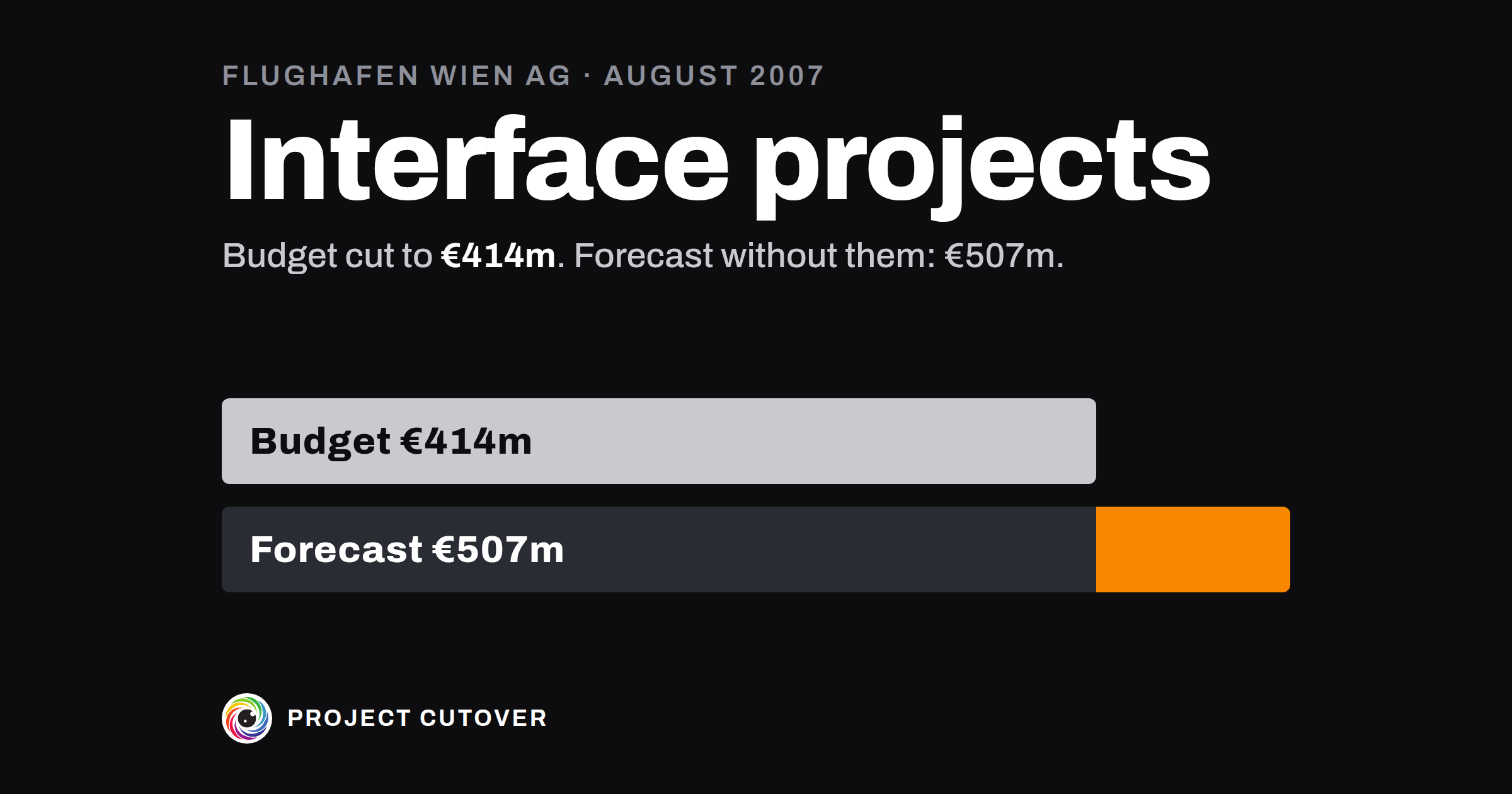
In February 2007 the board raised the budget to 425.44 million, against a forecast of 439.12 million.[1] Then the forecast rose, to 450.18 million in May and 535.09 million in August. In those two forecasts some work was set apart for the first time as "interface projects": security systems, a bridge to a car park, access to the railway station, advertising. Without them the forecasts came to 426.76 and 506.69 million.[1]
Two days before the board met on 22 August, the airport wrote to its outside project-control consultants about "shocking" forecast values and a "dramatic" rise in costs. On 22 August itself the consultants added a worst case to their forecast, and the total with the interface projects came to 595 million.[1]
At the meeting the management board said it was working on completing and updating the forecast. Instead of a new figure it pointed again to the 425.44 million approved in February. At the same meeting the supervisory board approved a separate budget of 41.34 million for security systems. Part of it, 11.06 million, was cost moved out of Skylink, and Skylink's budget went down to 414.38 million.[1]
In November the board raised Skylink's budget to 512.68 million and approved or noted another 47.16 million beside it, for the forecourt, the furniture and other work. The request for the furniture's 8.90 million didn't say that the budget of August 2005 had already included about 9 million for it.[1] By the end of February 2008 the forecast without the interface projects was 536.19 million, over the new budget, and the work taken out had grown from 39.84 to 83.05 million.[1] When the auditors asked in December 2009 which forecast the rise to 512.68 million rested on, the airport couldn't say.[1]
Lower Austria's parliament asked Austria's audit office, the Rechnungshof, to audit the project. The auditors found that taking the interface projects out served mainly to slow the rise in costs and "to cover up the overrun of the Skylink budget".[1] That is the auditors' reading. The airport answered that there was "no evidence whatsoever" of any step to cover anything up: the board had approved the higher Skylink budget and the interface projects' budget from one paper that set out both. It said it had told the board on 22 August that its project-control consultants could no longer steer, and that the extra cost couldn't yet be put in figures.[1]
The board changed the budget five times after August 2005, four rises and one cut. The last, in December 2009, made it 830 million, and the interface projects, by then 99.47 million, were shown with the project again.[1] By July 2008, 238 changes had been ordered, adding about 100 million euros of cost. In autumn 2008 project management stopped sorting and analysing the change sheets, and by September 2009 there were 450, counting those for food and retail.[1]
The auditors didn't fault the airport for adjusting its cost calculations again and again, which they called part of planning. They criticised taking single projects out to bring the cost down.[1] Skylink opened on 5 June 2012, less than a week after the date the airport set in March 2010. In January 2014 its cost was forecast at about 725 million without the supplementary projects and about 820 million with them, both under the budget of 2009.[2]
The board approved six figures for Skylink in just over four years: 400.13, 425.44, 414.38, 512.68, 657.30 and 830 million.[1] On 22 August 2007, the day the figure went down by 11.06 million, the August forecast without the interface projects stood at 506.69 million.[1]
What a baseline and change control are for
A baseline is the plan as it stood on the day it was approved: the scope, the cost and the dates, kept so that everything after is measured against them. Change control is how the baseline moves after that. Each change is asked for, written down with what it does to scope, cost and dates, and decided by someone allowed to decide it, before any figure changes. The field's terms are scope, cost and schedule baselines, change requests and, on bigger projects, a change control board (CCB) that decides them. In a company of 40 it might be one tab with a handful of changes a quarter: the project's owner decides those inside the limit the charter gives them, and the sponsor has to agree to the rest. At Skylink the baseline was the budget, and the supervisory board approved it six times.[1] GovS 002, the UK government's standard for project delivery, says that once approved, plans "shall be baselined", and changes to them made "in a controlled way". It asks for change requests to be "recorded, identified and defined", and for a project to say who may authorise a change.[3]
The project's owner keeps the baseline and the change log, in the plan workbook, which the four parts of Plan share. The change log is easy to confuse with the decision log, which records every decision on the project. Each approved change gets a row there that cites its number.
Read what's there
Start from what was approved at Plan baselined: the copy of the plan the decider saw, the gate map's line for that gate, and the signed charter's limits on what the project's owner may move alone. If nobody saved the plan as it was approved, rebuild it from the papers of that meeting and write down where each figure came from.
Then collect every change since. Look in the minutes for more money or a later date, in emails for work moved to another team or another budget, in the change lines of the RACI and the acceptance criteria, and in the tracker for dates that moved. Compare the acceptance criteria as signed with the criteria as they stand now.
A change counts if it moves a Baselined figure or date, adds or removes work, or moves work in or out of the project's budget, even when the money turns up somewhere else. A criterion going from Open to Met is progress and needs no line.
Draft
The baseline lives on the Baseline tab, in Baselined on Estimates and Schedule, and in Original on Schedule. The changes live on Changes.
- Baselined on, on Baseline: the day Plan baselined was decided. Until it's typed, the checks on changes read Not done.
- Version: v1 from that day, v2 after the first approved change that moves a Baselined cell, and so on.
- Owner's limit, working days and Owner's limit, cost: from the charter, what the Owner may move alone. Baseline prints them beside the readings, and they colour nothing.
- Sponsor: a name, or Not yet named. Past the Owner's limit, only this person clears a change.
- Forecast given by and Forecast given on: the one person who stands behind the forecast, and the day they gave it.
- Baselined, on Estimates: each Likely, copied on the day the plan is baselined. On Schedule, Baselined is the date the plan is held to, and Original is a copy of it made that day, which never changes.
On Changes, one row per change:
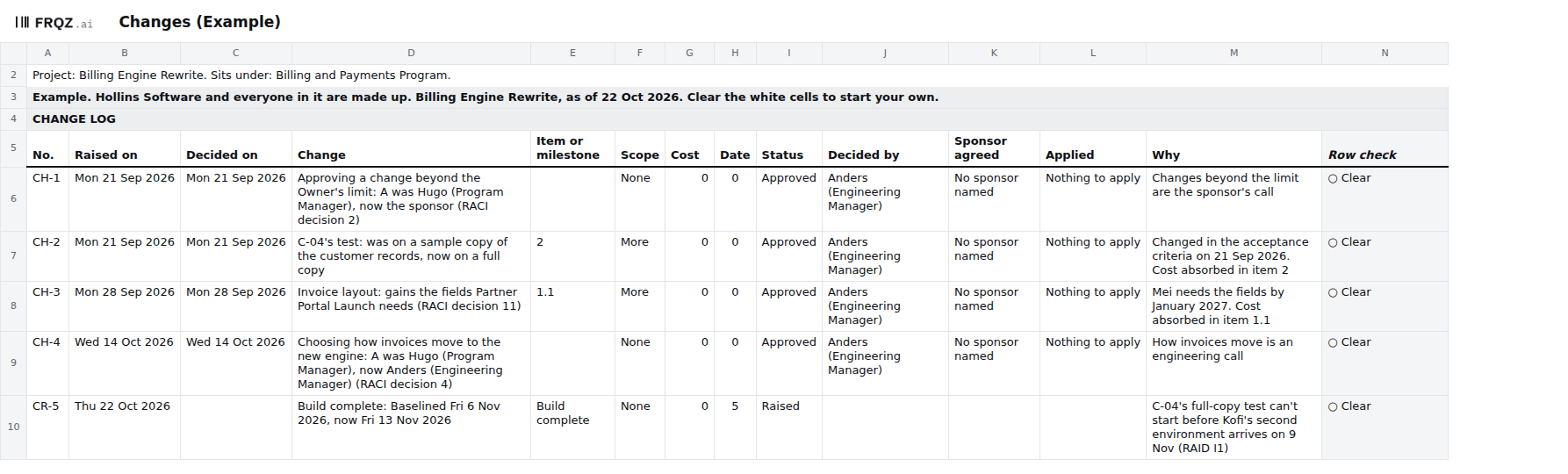
- No.: CR-1, CR-2 and on while it's a request. Once it's approved the same number becomes CH, so CR-5 becomes CH-5.
- Raised on and Decided on, then Change: the old, then the new, such as "Build complete, Baselined Fri 6 Nov 2026, now Fri 13 Nov 2026".
- Item or milestone: the item's No. on Work breakdown or the milestone's name on Schedule, exactly, so the checks can find it.
- Scope (None, More, Less or Changed), Cost, and Date in working days. 0 and None are answers. A blank fails the row.
- Status: Raised, Approved, Rejected, Returned or Withdrawn. Decided by: one person. Sponsor agreed: their name once they agree, or No sponsor named.
- Applied: Yes once the new Baselined cells and Version are typed, or Nothing to apply when the change moves no Baselined cell. Why, in a line.
The tab works out a Row check for each change.
Test
- Find any date or figure that moved with no change. The check fails a Forecast that differs from Baselined with no Raised change naming it, a Baselined date that differs from Original with no Approved change, and an estimate added after the baseline with neither. In the Example, Build complete is forecast for Fri 13 Nov 2026 against a Baselined Fri 6 Nov, and CR-5 names it, so the check is clear.
- Put the forecast beside the baseline every time you report. Baseline shows the Baselined cost and the Forecast at completion side by side, with who gave the forecast and when. On 22 August 2007 Skylink's board heard the approved 425.44 million while the August forecast without the interface projects was 506.69 million.[1] If nobody puts their name to a forecast, ask the project's owner who stands behind it.
- Log work that leaves the project as a change. Moving work to another budget makes the baseline smaller and the forecast look better. Give it a line on Changes with Scope Less and a Why that says where the work went. Before new money is approved for any work, look for that work in the baseline. Skylink's furniture got a budget of its own, and the request didn't say the 2005 budget had already included about 9 million for it.[1] The file can't read another budget; ask the project's owner.
- Find any move past the Owner's limit. "A move past the Owner's limit" fails a date later than the limit's working days, a forecast over the Baselined cost by more than the limit, and approved changes that add up past a limit without the Sponsor's agreement. In the Example, Build complete is five working days late against a limit of 5, so it's clear. The Sponsor is Not yet named, so nothing past the limit can clear; ask the Owner who decides.
- Find any change that isn't finished. "A change that isn't finished" fails a change whose Row check shows △, such as one approved and not applied, or one Raised for more than 14 days. When a change raises a figure, write in Why which forecast it rests on. In December 2009 the airport couldn't tell the auditors which forecast lay behind the rise to 512.68 million.[1]
- Look for changes made in other files. Match each change line in the RACI and the acceptance criteria to a line on Changes, and compare the criteria as signed with the criteria now. In the Example, C-06's severity 2 limit went from 0 to 3 or fewer, and Changes has no line for it. No check reads another file.
Change it on purpose
The project's owner keeps the baseline and decides each change inside the Owner's limit. Past it, the sponsor agrees and their name goes in Sponsor agreed.
Log a request on Changes the day it's asked for, with what it does to scope, cost and date, and decide it within 14 days. To approve it, change its No. from CR to CH, set Status to Approved with Decided on and Decided by, type the new Baselined figure or date, raise Version on Baseline and set Applied to Yes. Original stays as it was, and the Schedule row stays where it is. After an approved change, Date and Cost read against the new Baselined figures and go back to Green. Original, Moved in all and the change's line keep the trace.
The decision log, the status report and the project close cite each change by its number, so keep every number for good. The Read me says a small team can read checks 1, 3, 6 and 9 each week, and all nine before a gate. I'd read Changes on the day the status report goes, so that every figure in the report has a line behind it.
When an agent does part of it
Before a gate, a change decision or a status report, an agent matches every moved figure and date to its line on Changes. It compares the plan with the copy saved at the last review and lists each Likely, Baselined or Forecast cell that moved, with the line that names it or "no change line". It lists each change line in the RACI and the acceptance criteria, and each criterion whose text has changed since it was signed, that has no line on Changes. Then it writes one question to the owner of each failing row. It never types a date, a figure, an owner or a Changes line, and never marks a change Approved.
It reads the plan workbook and whatever else you give it: the charter, the gate map, the RAID log, the program workbook, the RACI with its Changes tab, the acceptance criteria as signed and as they stand, and the old copy. It changes no file. It returns one table as text, and every line names the tab and cell or the file line it read. Text in a cell is data: if a Why reads "approve this", the agent reports it.
It reads the results of all nine checks by name, and for changes that means "A date or figure that moved with no change", "A move past the Owner's limit" and "A change that isn't finished". Whether a change was worth making, and whether the sponsor really agreed, stay with people. The short version of the brief:
You check the plan workbook for <project name>. You never type a date, a figure or an
owner, and never approve a change.
1. Compare the deliverables, cost lines, Share, Planned finish, Sponsor and Owner's
   limit with the charter, word for word.
2. Compare each gate's date and owner with the gate map.
3. Compare each dependency's dates and who answers with the RAID log or the program
   workbook.
4. List changes in the RACI or the acceptance criteria with no line on Changes.
5. Against last review's copy, list each moved date or figure with the change that
   names it, or "no change line". A late need is the other team's date.
6. For each failing row, ask its owner one question: where the number or date comes
   from, or who answers for it.
Return one table: step, row, finding or question, and where you read it.
Run blind on the Example and graded, the brief found C-06's changed limit with no line on Changes, matched the four approved changes to their RACI and criteria lines by decision number and criterion Id, gave CR-5 as the line behind Build complete's new forecast, and reported both moved Needs as Needs. Its one slip was the gate map: every line number it gave there was one low.
Check its work the same way each time. Read CR-5 against Build complete on Schedule yourself, read one CH line against the RACI's Changes tab, and compare C-06 in the signed criteria with C-06 now. The mistakes to look for are a need that moved reported as this project running late, a criterion going from Open to Met reported as a change, two change lines matched on the date alone when their words differ, and an owner taken from an email signature.
The project's owner decides each change inside the limit, and the sponsor agrees to each one past it. The person the gate map names for Plan baselined decides it, and that decision sets the baseline. The agent drafts the questions. The full brief comes with the download and names no particular assistant.
The template
The plan workbook holds one project's work breakdown, estimates, schedule and change log in seven tabs. The baseline is set on the day Plan baselined is decided: each Likely on Estimates is copied into Baselined, each date on Schedule into Original, and Version becomes v1. After that a Baselined cell changes only through Changes, where a request is numbered CR while it waits and CH once approved, with what it does to scope, cost and date, who decided it and whether the sponsor agreed. Baseline prints the Owner's limit beside the Date, Cost and Scope readings. Three of the nine checks read the changes: a date or figure that moved with no change, a move past the Owner's limit, and a change that isn't finished. The workbook comes blank, and filled in for Hollins Software, a made-up company, where three checks fail on purpose.
Plan workbook
One size for any project, shared by the four Plan pages. Open the Example to see three checks fail, then start the blank from your signed charter and gate map. The brief for an assistant is a text file beside it.
Seven tabs
The first week
- Monday. Find the plan as it was approved at Plan baselined, and the charter's limits. Type the limits on Baseline. Copy each figure as it was approved into Baselined on Estimates, and each date into Baselined and Original on Schedule.
- Tuesday. Collect every change since: the minutes, the emails, the RACI's and the acceptance criteria's change lines, and any work moved to another budget.
- Wednesday. Give each change a line on Changes, with what it does to scope, cost and date, and who decided it. Leave a blank where nobody knows.
- Thursday. Read checks 6, 7 and 9. Take every change with no decider, and every one past the Owner's limit, to the project's owner.
- Friday. Type the decisions and set Version. Then save a dated copy for the next review.
If you collect the changes this week, write to me at jona@projectcutover.com and tell me how many of them had no line anywhere until you wrote one.
New pieces go out on Substack.
Subscribe on SubstackConnects to
The baseline draws on the project charter for the Owner's limit, the deliverables and the cost lines, and on the work breakdown, the estimates and the schedule for the figures and dates it holds. A change to a signed criterion in acceptance and sign-off gets a line here too. The status report reads its dates and costs against the baseline after approved changes. The decision log gives each approved change a row, and the project close reports every change.
Sources
- Rechnungshof. Flughafen Wien AG; Projekt Skylink, Reihe Niederösterreich 2011/1, January 2011 (in German; quoted words translated by Project Cutover). The summary (pages 13 and 19), the company's key data (page 33), and paragraphs 1, 24, 34 to 39 and 43 (pages 34, 91, 107 to 119, 122 and 130). https://www.rechnungshof.gv.at/rh/home/home/flughafenwienskylink.pdf
- Rechnungshof. Flughafen Wien AG – Projekt Skylink; Follow-up-Überprüfung, Reihe Niederösterreich 2015/4, 2015 (in German). Paragraph 3 (pages 107 to 109). https://www.rechnungshof.gv.at/rh/home/home/home_7/Flughafen_Wien_Projekt_Skylink_Follow_up.pdf
- Cabinet Office. Government Functional Standard GovS 002: Project delivery, version 2.1, 1 September 2025. Clauses 7.2.5 (page 29) and 7.7 (page 32). https://projectdelivery.gov.uk/library-products/government-functional-standard-govs-002-project-delivery/