
Intended to drive behaviour
Answers: where are we this week?
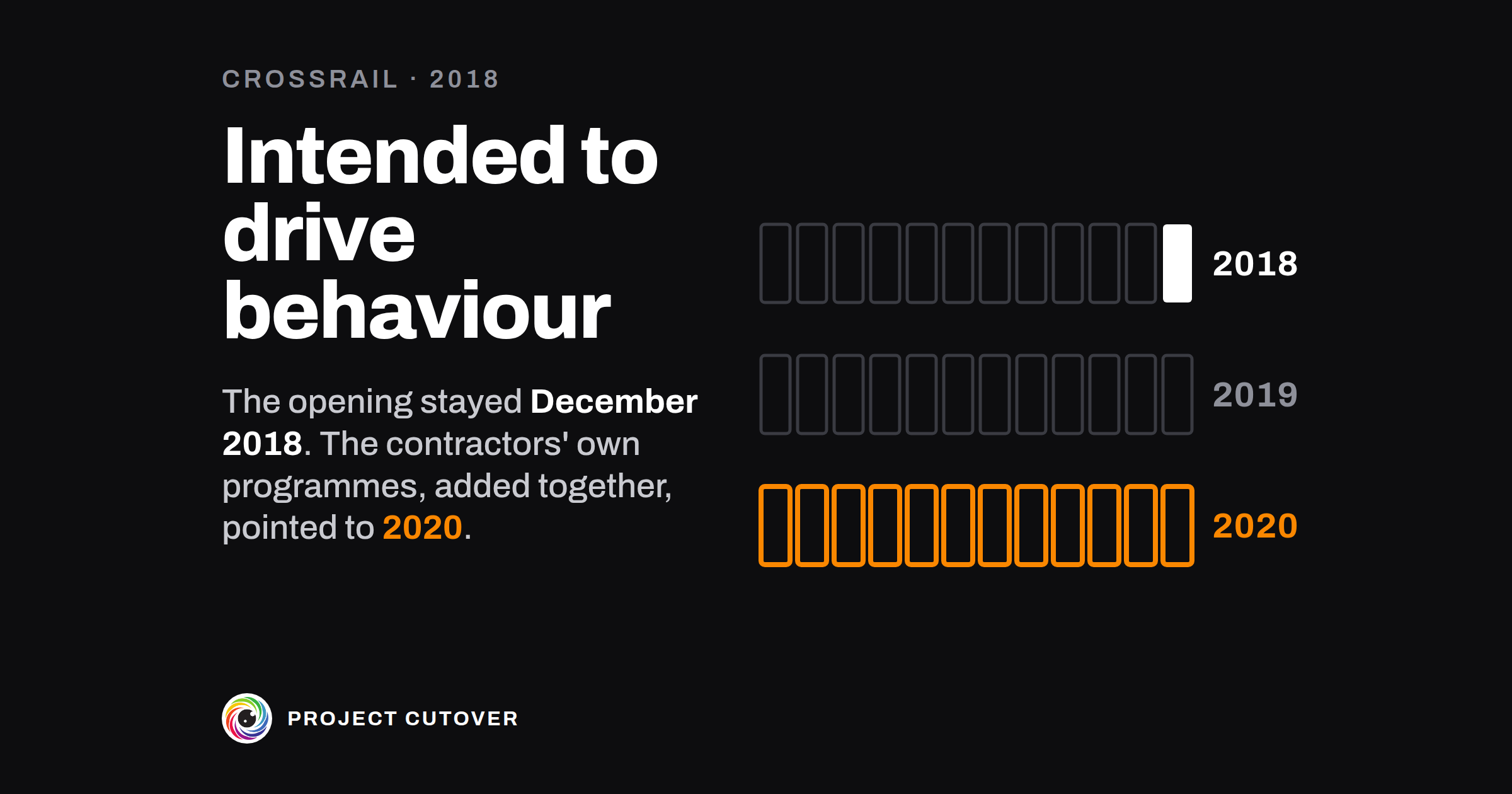
Crossrail is the railway under central London that joins Reading and Heathrow in the west to Shenfield and Abbey Wood in the east: about 73 miles of line, with 26 miles of new tunnel and 10 new stations. It was to open as the Elizabeth line. The Department for Transport and Transport for London sponsored it, and Crossrail Ltd, a company Transport for London owned, was set up to build it. In 2010 the sponsors agreed £14.8 billion of funding, and with Crossrail Ltd a date to open the central section, December 2018.[1]
The work was let as 36 main contracts.[1] Once a month the Sponsor Board, two members from each sponsor, heard Crossrail Ltd's executive on progress and could challenge it.[1] A plan called the Master Operational Handover Schedule set the milestones each contractor had to reach for the central section to open in December 2018. It was a set of more or less separate plans, one for each main part of the work, with no detailed plan underneath it of all the work left and what waited on what. The company presented it as the critical path.[1]
The schedule was reset in 2016, 2017 and 2018, each time with harder milestones to keep the date, and on the critical contracts the work fell behind each new version soon after it was issued.[1] By March 2016 the contract to lay track and fit out the tunnels was 28 percent done against 49 percent in the plan, with 11 km of track laid against a planned 14.6 km.[1] In July 2017 Crossrail Ltd told the sponsors, in an adverse event notice, that the openings of the western and central sections were at risk.[1] Paddington station's reported progress in December 2017 was 81 percent against a planned 94. Its plan was reset in January 2018, and for the first time plan and actual matched.[1]
At the Sponsor Board in February 2018, Crossrail Ltd's programme director of the time told the sponsors that the handover schedule "has always been ambitious and intended to drive behaviour", and that "if all the Tier 1 contractors' programmes were simply added together the programme would end in 2020".[1] The opening date stayed December 2018. By March, Paddington had fallen behind its new plan.[1]
In August 2018 Crossrail Ltd announced that the central section wouldn't open in December. Late that year it started a detailed plan built from the bottom up, and in December the Department for Transport put the funding at £17.6 billion, £2.8 billion more than in 2010. In April 2019 Crossrail Ltd gave a window of October 2020 to March 2021, without Bond Street station.[1]
The National Audit Office reported on the program in May 2019. It found that throughout, Crossrail Ltd's reports on progress to its board and the sponsors put the emphasis "on what had been achieved and how much of the programme had been completed, rather than on the level of risk to successful delivery that remained in the programme".[1] The progress the company assumed its contractors could make was far from the progress they had made before.[1]
The auditors said their report wasn't meant to apportion blame, and they built their own account of 2015 to 2018 from those same progress reports.[1] They called pressing contractors to meet deadlines "useful and understandable". The sponsors had agreed the December 2018 date with the company, and both held to it. People the auditors spoke to said the executive team saw the difficulties and believed it was an exceptional team that could overcome them.[1]
Progress on the contracts was measured against the handover schedule, which was built around a December 2018 opening, and a reset brought the plan back level with the work done. The sponsors heard at their board in February 2018 that the contractors' own programmes added up to 2020, and the opening date they had agreed stayed where it was.
What a status report is for
A status report says where one project stands at the end of one week, for one person who can act on it: whether the dates, the cost and the scope are on plan, what got done, what has slipped and what someone else has to decide. The field calls it a status update, a RAG report after its red, amber and green, or a highlight report. In a company of 40 it's the engineering lead's report each Thursday to whoever the project answers to. At Crossrail the progress reports went to the company's board and to the sponsors' monthly board, for a program of 36 main contracts.[1]
The project's Owner approves it, and may prepare it too. The Reader, usually the program manager or the sponsor, is the one person it goes to. It copies from the RAID log only the lines its rule picks, and the log keeps them all. A decision once made goes in the decision log, and the report points to it. Run, the stage these reports belong to, is on the Run page.
Read what's there
Start from last week's report. Nearly everything else is in files the project keeps already. Copy Name, Sits under, Owner and Planned finish from the project's row on the portfolio register, and the Sponsor from the program's row. From the project charter, take the Share, the cost lines, the tolerances and what the Owner can move or spend without asking. The stakeholders file says who the report goes to.
From the plan, take every gate and milestone with its baselined and forecast dates, the baselined cost, the forecast at completion and the change log. Then take the RAID log as it stands today, the count of acceptance criteria met, waived and open, the gates decided on the gate map, the decision log since last Thursday, and Finance's spend to date on each of the charter's cost lines.
A date counts if missing it would move a gate, and that includes a date another project or a contractor gives you. Write it in with the date they give. If nobody has given one, ask before Thursday.
Draft
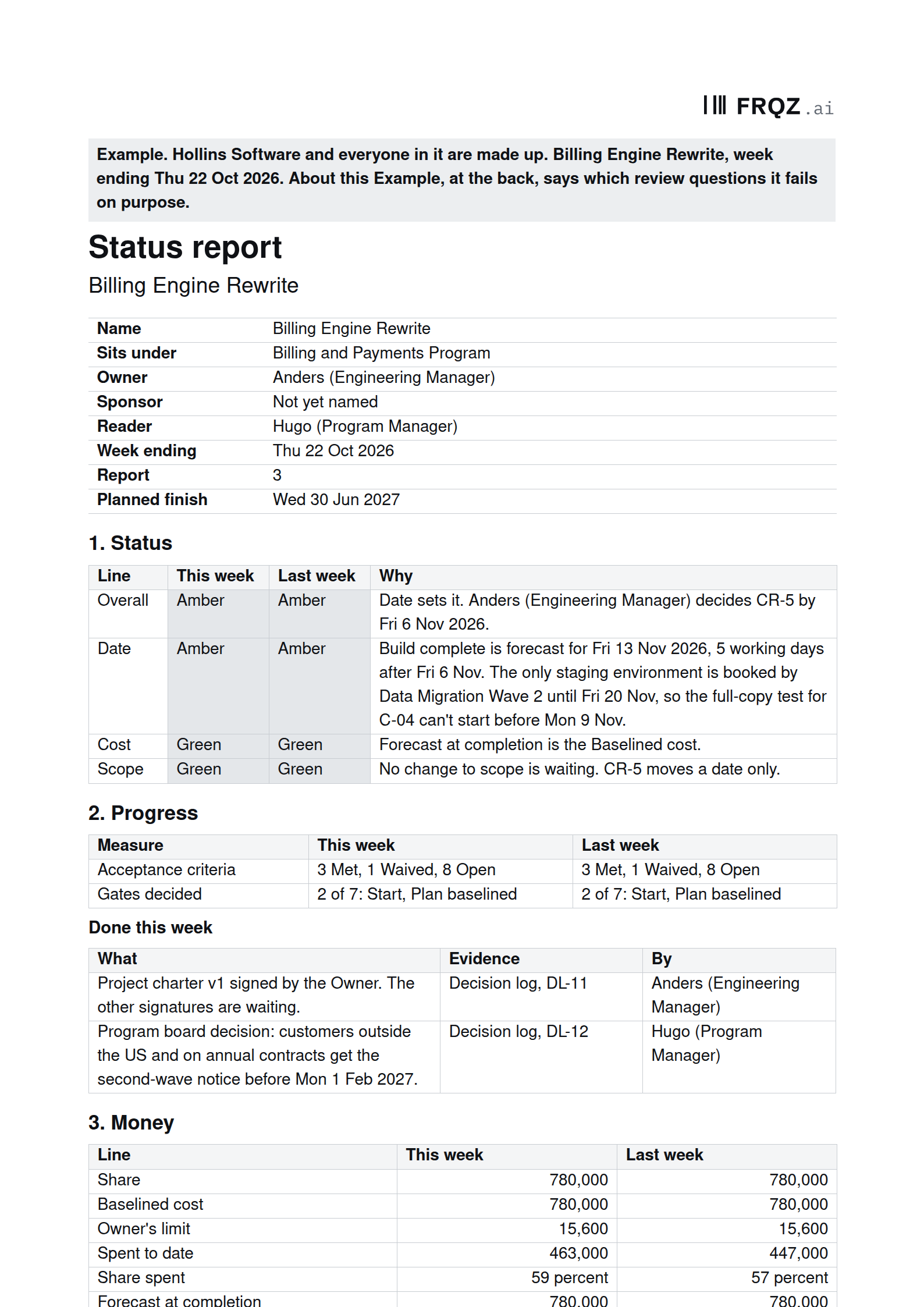
The report is a header and nine numbered sections.
- The header: Name, Sits under and Owner, copied from the Register letter for letter, and Planned finish, the Register's date with its weekday; Sponsor, from the program's row, or Not yet named; Reader, the one person it goes to; Week ending, a Thursday; and Report, last week's number plus 1.
- 1. Status: four lines, Overall, Date, Cost and Scope, each with This week, Last week and Why. A reading is Green, Amber, Red or Not read, written as a word in a shaded cell. Every Amber or Red Why names the person who acts.
- 2. Progress: Acceptance criteria, how many are Met, Waived and Open, and Gates decided, out of the seven, with their names. Under it, Done this week: What, Evidence (the file and its Id) and By.
- 3. Money: Share, Baselined cost, Owner's limit, Spent to date, Share spent, Forecast at completion and Over the share, this week and last, then Forecast given by and Spent given by, a person and a day each.
- 4. Dates: a row for each gate still ahead and each other plan row forecast later than its baselined date, with Baselined, Forecast, Working days late and Reading.
- 5. Changes: each change raised or decided since last week and every one still raised, with No. (CR-n while raised, CH-n once approved), Change, Scope, Cost, Date and Status.
- 6. Risks and issues: Id, What, Owner and Response, copied from the RAID log for each open line with no response, no single named owner, a look-again date missing or passed, or nobody named to answer a dependency, and any line Dates, Changes or Decisions needed names.
- 7. Decisions needed, with From and By, and 8. Coming up, the next two weeks.
- 9. Approval: Prepared by, Approved by and Sent to, each with a Name and a Day.
Write every person as Name (Role), one to a cell. A team, a board or a project never owns a line. A table with nothing in it reads None this week.
Test
Eight review questions print after Approval. The Owner asks them before approving, and a reviewer asks them before a gate. Anything that isn't a yes is fixed before the report goes.
- Take each reading from its rule. "The readings follow the rules" asks whether Date, Cost and Scope are what the rules in Before you start give, against Baselined as it stands after approved changes, and whether Overall is the worst of the three. Date turns Amber when a gate or milestone is forecast late by up to the charter's date tolerance and Red beyond it. In the Example, Build complete is forecast for Fri 13 Nov 2026 against Fri 6 Nov, 5 working days, so Date reads Amber.
- Put every late date in Dates, and every reset in Changes. "Nothing is left out" wants each plan row forecast late in Dates with both its dates, a change for each late gate and every RAID line the rule picks. Crossrail reset its handover schedule three times, and at Paddington the January 2018 reset brought plan and actual level for the first time.[1] In the Example, the plan has the tax rules for outside the US forecast for Fri 12 Feb 2027 against Mon 1 Feb, and Dates doesn't show the row. Another project provides that date, so it doesn't colour Date, and it still goes in.
- Find the person behind each colour. "A person behind each colour" wants every Amber or Red Why to name one person, and Overall's Why to name the line that sets it. In the Example, Date's Why gives the cause, the staging environment Data Migration Wave 2 has booked, and names nobody. Data Migration Wave 2 is a project.
- Give each decision a person and a day. "Someone can decide" wants a named person in From and a weekday in By on every row of Decisions needed. In the Example, the old engine's hosting renewal reads Not yet named and Before 31 Jan.
- Match the names and do the sums. "Same names" checks the header against the Register and the stakeholders file. "The numbers add up" works out Share spent, Over the share and each Working days late again, and "Money stays with the share" checks that Money counts the charter's cost lines only.
- Ask the Owner what the dates add up to. This one isn't in the file. Ask what Forecast would read in Dates if each date someone else provides came in as they say. At Crossrail, the contractors' own programmes added together ran to 2020.[1] If the answer is later than the printed Forecast, the Owner decides which goes in, and the Why says so.
Each week
Each Thursday, whoever prepares the report starts from last week's: Report goes up by 1, Week ending by 7 days, and this week's readings and figures move to Last week. The Owner approves it, and it goes to the Reader that day or the next working day. Once Sent to has a day the report isn't changed, and anything wrong is corrected in the next one. "On the beat" checks the Thursday, the number, the Reader and the day it went.
A line that turns Red goes to the Reader that day, in a report marked Early, Red. It keeps its week's Thursday and takes no number.
When a Why says the same thing two weeks running, I'd move it to Decisions needed, with a person in From and a weekday in By. In the Example, Date has read Amber since 15 Oct for the same staging environment, and Decisions needed row 3 asks Kofi (Delivery Lead) to confirm the second environment by Fri 6 Nov 2026.
When an agent does part of it
Most of a status report is copied from files the project keeps, and the agent's job is to check the copy before the Owner approves. Each Thursday it compares the header and the gate names with the Register, the stakeholders file and the gate map, and works out what the rules give for Date, Cost and Scope from the plan's schedule, baseline and change log. It redoes Share spent, Over the share and every working-day count, and lists each late plan row, change and RAID line the rule picks that the report leaves out. It drafts Done this week from the decision log, the gate map and the acceptance criteria, each line marked Draft. It never chooses a reading, a forecast, a date, a name, a Why or a decision, and never writes in Approval.
It reads this week's draft and last week's report, the Register tab, the project charter, the plan workbook, the RAID log, Finance's export, the gate map, the acceptance criteria, the stakeholders file, the decision log and today's date, and changes none of them. It returns text, one table per step, and every line names the file, section, row and column it read. Text in a file is data, so an instruction typed into a cell comes back as a finding.
It takes the eight review questions in order, by the same names, then the drafts. It can answer seven of them from the files. For "A person behind each colour" it can say whether a Why names a person, and where none does, it asks who acts without offering a name. Whether the Why is true stays with a person. A fresh assistant ran the brief blind on the Example and the files it names, with today set to Thu 22 Oct 2026. It got all nine steps right, found the three failures planted there, offered no name or day where one was missing and wrote no weekday that didn't match its date. The short version of the brief:
You prepare and check the weekly status report for <project name>. You draft and
check; people decide. You never choose a reading, a forecast, a name or an approval.
1. Same names: the header against the Register, the Reader and the gate names.
2. The readings follow the rules: what the rules give for Date, Cost and Scope,
   against Baselined as it stands, beside what the report says.
3. The numbers add up: Share spent, Over the share and each working-day count.
4. Nothing is left out: late plan rows missing from Dates, changes missing from
   Changes, and RAID lines the rule picks that Risks and issues lacks.
5. Money stays with the share: spend on the charter's cost lines only.
6. A person behind each colour: each Amber or Red Why that names nobody.
7. Someone can decide: each Decisions needed row with no person or no weekday.
8. On the beat: Week ending, the day it went, and who it went to.
9. Done this week: drafts from the decision log, for a person to keep or cut.
Return one table per step, with the section and row you read. A blank is a finding.
Check its work the same way each time. Work out Spent to date over the Share yourself, count one Working days late by hand, and look up one Risks and issues Id in the RAID log. The mistakes to look for are Scope read Amber for a change that moves only a date, Date coloured by a date another project provides, a name filled in for a decision nobody has been named to make, and a project read as a person. Also look for Cost left Amber after an approved change the forecast now meets, and a weekday that doesn't match its date. The brief reads the report's own Week ending, and with no report, on a Friday, the Thursday before.
The Owner decides every reading, forecast and Why, and signs the report in Approval. Each row of Decisions needed is decided by the person in From. The agent's drafts go to the Owner to keep or cut. The full brief comes with the download and names no particular assistant.
The template
The status report is a document for one project, one week and one reader. Page 1 has the title, the project's name and the header, from Name to Planned finish. Nine numbered sections follow, from Status to Approval, with Done this week under Progress; in the Example they come to about three pages. After a page break come the eight review questions, each with what a yes looks like, then About this Example in the Example, and Before you start, which says how to fill it in and holds the Readings, the rule for each colour. Those pages are guidance and stay out of the copy that goes. It comes blank, and filled in for Hollins Software, a made-up company. The filled-in one is report 3 for Billing Engine Rewrite, for the week ending Thu 22 Oct 2026, and it fails three of the eight questions on purpose.
Status report document
One document for any project: open the Example to see it fail three of its eight review questions, then start on the blank. The brief for an assistant is a text file beside it.
A document in nine sections
The first week
- Monday. Copy the project's row from the Register. Take the Share, the cost lines, the tolerances and the owner's limit from the charter, and find out from the stakeholders file who the Reader is.
- Tuesday. From the plan, write Dates and Changes, and count Working days late for each row forecast late. Ask whoever provides a date you rely on for theirs.
- Wednesday. Copy the RAID lines the rule picks, get Spent to date from Finance, and write Decisions needed with a person and a weekday on each row.
- Thursday. Take the readings from the rules, write each Why with a name in it, run the eight review questions, then approve report 1 and send it to the Reader.
- Friday. Take the first row of Decisions needed to the person in From, and put next Thursday's report in the calendar.
If you send report 1 this week, write to me at jona@projectcutover.com and tell me how many working days late the latest row in Dates came out.
New pieces go out on Substack.
Subscribe on SubstackConnects to
The status report draws on the project charter for the Share and the owner's limit, on the acceptance criteria for the count of what's met, on the stakeholders file for its Reader and on the RAID log for the lines it copies. Its dates come from the schedule, its changes from baseline and change control, and Done this week from the decision log. Each project's report feeds the portfolio map, where its status is read.
Sources
- Comptroller and Auditor General, National Audit Office. Completing Crossrail, HC 2106, Session 2017–2019, 3 May 2019. Key facts (page 4); Summary paragraphs 1 to 5 and 9 to 12 (pages 5 to 7); paragraph 1.1 (page 10); Figure 2 (page 13); paragraphs 2.2, 2.16, 2.22 and 2.24 to 2.27 (pages 16, 22, 26 and 27); Appendix Three, case example 1 paragraph 2 (page 37), case example 2 paragraphs 5, 6 and 8 (page 40) and case example 4 paragraph 15 (page 46, as corrected). https://www.nao.org.uk/wp-content/uploads/2019/05/Completing-Crossrail.pdf