
The magic sum
Answers: how sure are we of that date?
The Staatsoper Unter den Linden is Berlin's state opera house. It was built in the 1740s, rebuilt after a fire in 1843 and again after bombing in 1941 and 1945, and has been a listed building since 1979.[1] Berlin set out to refurbish the opera house and the two buildings that go with it, an administration building and a store building. The federal government agreed to pay 200 million euros and no more, and a supporters' association pledged 30 million. As the builder, Berlin carried the risk of any rise in cost.[1]
In September 2005 the opera foundation's board chose an option costed at 121 million euros.[1] An official from the city's culture office later told the Berlin parliament's committee of inquiry that the costing was "a system of Lego bricks", measures picked out of earlier plans. It was "purely deductive" and not yet backed by tenders or market prices, at a size "we believed might be financially reachable".[1] The costing took no account of risk, and left out removing pollutants, sealing the building against groundwater and rising building prices.[1]
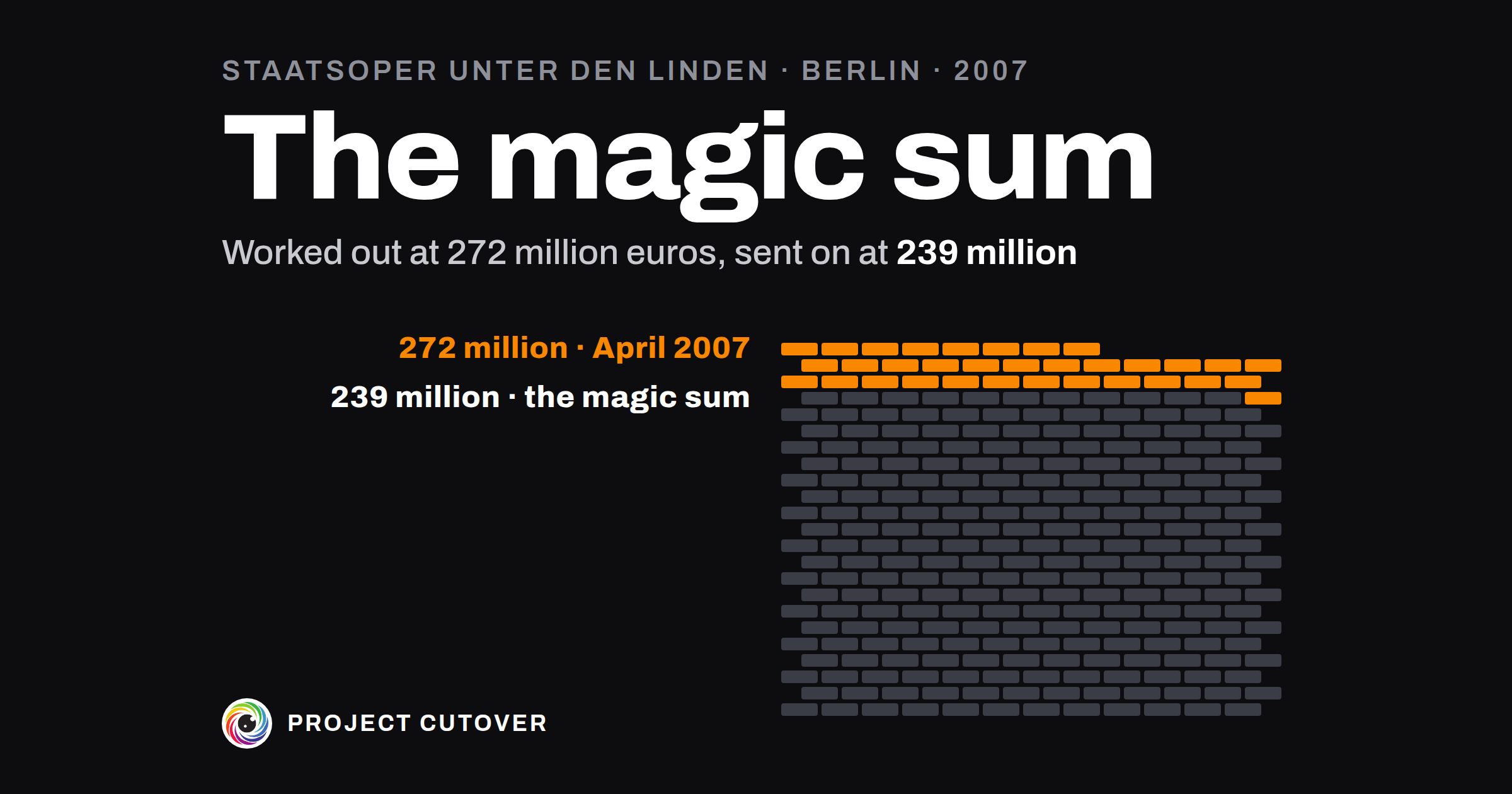
On 16 April 2007 the client, the culture office, by then part of the governing mayor's chancellery, issued the first needs programme, its statement of what the refurbishment had to cover.[1] The city's building authority had worked out its cost: 272 million euros, and about 20 million more for a temporary stage.[1] Those costs, the committee wrote, "appeared to the client not politically communicable".[1] The director general of the opera foundation remembered the estimate as about 300 million. In his account the governing mayor said at a staff meeting that it had to come down by 50 million: "roughly that size, I don't want to swear to it exactly any more."[1] The building authority, he said, proposed cutting the store building's refurbishment, which came to about that much. He argued against it, and on a walk round the site with the mayor it was decided the store building didn't need it.[1] The committee's report gives that meeting from his evidence alone.
The store building's refurbishment, 66 million euros in the first programme, was 30 million in the version that went forward, for less than half the floor space.[1] That version came to 239.0 million in all, with 30.6 million for unforeseen work, and the Senate adopted it in November 2007.[1]
The committee found that the 239 million "was not to be exceeded because of political requirements".[1] The state secretary for culture called it "the magic sum": whenever it was crossed, the matter landed on his desk and new savings had to be agreed.[1] In October 2007 the engineers costing the foundation work advised a margin of 30 to 50 percent for risk on that work.[1] The advice wasn't followed: the building authority pointed to the city's building instruction, 10 percent for an old building.[1] "Otherwise you couldn't have kept to the cost cap at all," an official there told the committee, adding that a bigger margin would have been very hard to justify.[1] The cost rose to 296.3 million in May 2013 and about 400 million in May 2015, and the building time went from three years to seven.[1]
The committee's majority put the climb from 121 to 239 million down to a more detailed and reliable costing, with the building and the ground surveyed earlier than was usual then.[1] Two officials on the building side told the committee the biggest part of the later rise came from the state of the building itself.[1] The majority noted the witnesses' agreement that the building and the ground, worse than anyone had expected, had a substantial share in the extra cost.[1] It thought Parliament most unlikely to have approved a margin well over 15 percent at the time.[1] Berlin has since raised its margin for refurbishing old buildings.[1]
The building authority worked out the 272 million from the building. The 239 million was what was left once the scope came down, after the client found the first figure not politically communicable. A line beside each figure saying how it was made would have shown the difference. The old walls and the ground would still have added their share on top.
What estimates are for
An estimate says how much one piece of the work should cost, or how many days it should take, as a range, with the method and the evidence behind the number. A project keeps one for every item at the bottom of its work breakdown and adds them up into what the plan asks for. The field calls them cost or effort estimates. One with a low, a likely and a high is a three-point estimate, and the note of where each number came from is the basis of estimate. In a company of 40 a project of a few months might have ten to fifteen of them on one tab. Berlin's opera was costed again and again, from 121 million euros in 2005 to about 400 million in 2015.[1] GovS 002, the UK government's standard for project delivery, asks that estimates be "justifiable through evidence or experience" and that a plan show its "current level of certainty by, for example, using ranges or confidence indicators".[2]
Each item's owner gives its figure, and the project's owner keeps the estimates and stands behind the total. Estimates are easy to confuse with the budget, which is the money someone has agreed to give the project. The estimates say what the work will take, and where the two differ, whoever holds the money decides what gives. Both live in the plan workbook on the Plan page.
Read what's there
Start from the work breakdown: every item with no parts, and its owner. Then collect everything that already has a number in it: the charter's cost lines and Share, supplier quotes and rate cards, the tracker's history of a finished project like this one, and the finance export of what that project actually spent. A past project's actual cost tells you more than its old estimate did, so look for both and keep them apart.
Write down any figure somebody has already given for the total: a budget line, a number in a board paper, the Share in the program charter. Keep it on its own line as the figure you've been given, away from the estimates, so you can see how far apart they come out.
A number counts as an estimate when its owner can say where it came from. If nobody can, write it down anyway and leave its basis blank for the check to find.
Draft
The estimates live on the Estimates tab of the plan workbook, one row per item with no parts.
- Item: the item's number on Work breakdown, picked from a list. The tab fills in Name. A parent isn't estimated; its figure is its parts added up.
- Method: Bottom up, By analogy, Three-point or Fixed scope. Bottom up adds the item's own pieces, By analogy scales a finished piece of work like it, Three-point takes a low, likely and high from the people who'll do it, and Fixed scope is a scope or a price already agreed with someone.
- Basis: where the number came from, in up to 120 characters: a count, a past project, a quote. "A trial load of 200 invoices, per table" is a basis. "Experience" on its own isn't one.
- Low, Likely and High, in the Unit on Baseline, Money or Days. They may be equal, and they go in that order.
- Confidence: High, Medium or Low, how sure the team is of Likely.
- Baselined: typed once, on the day the plan is baselined, as a copy of Likely. After that it changes only through an approved change.
- Forecast: blank while the item is expected to come in at its Baselined figure. Type a figure when it's expected to move, and raise a change that names the item.
On Baseline, type the Unit, the Cost tolerance (10 percent in the Example), and the team's Range low and Range high for the whole project, set at the baseline. Then Forecast given by and Forecast given on: the one person who stands behind the forecast, and the day they gave it.
The tab works out the totals and a Row check that says in words the first thing wrong with each row. Baseline adds the rows into Baselined cost and Forecast at completion, and reads Cost: Green while the forecast is the Baselined cost or less, Amber while it's over by no more than the Cost tolerance, Red beyond. The tab holds 40 estimates.
Test
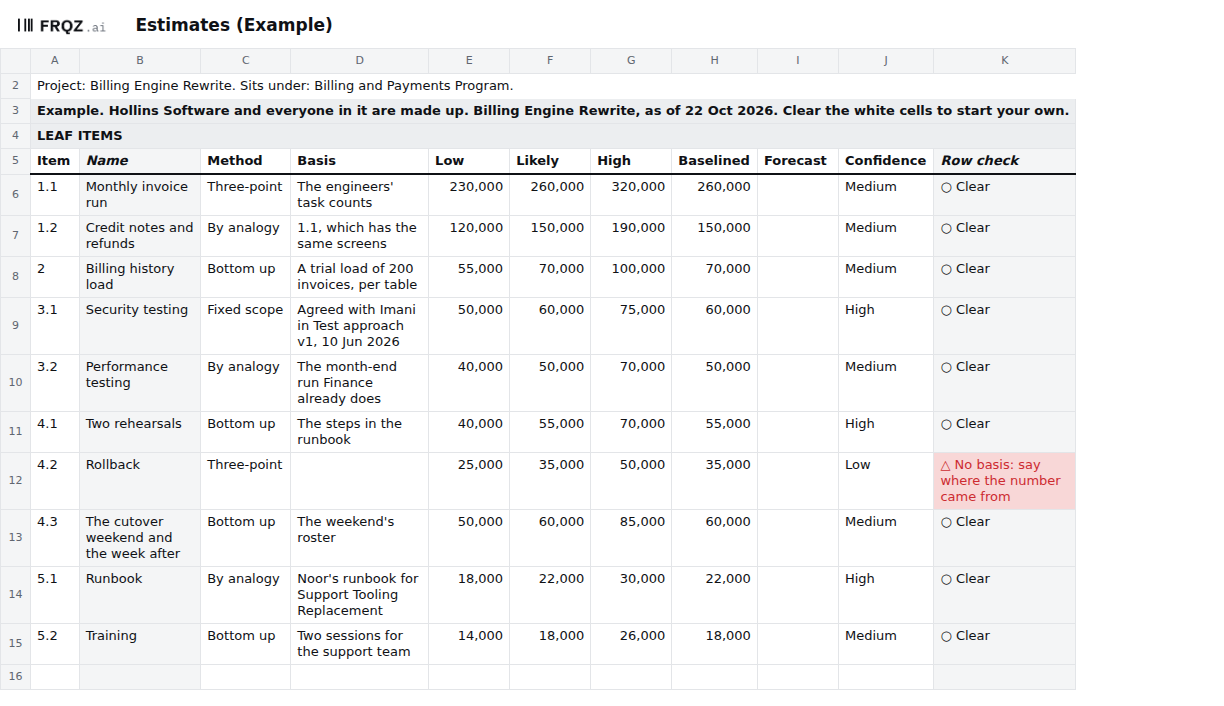
- Find any estimate without its basis. The check is "An estimate without its basis". It fails a row with a blank method, basis or confidence, a second row for the same item, or Low, Likely and High out of order. In the Example it fails on 4.2 Rollback, whose 35,000 has no basis and whose confidence is Low because the rollback hasn't been timed on a real copy. The check can only find a blank, so read each basis yourself. The building authority's memo of 11 April 2007 explained a rise of 110 million over the 2005 figure, to 231 million, and put 20 million of it down to a higher level of detail it didn't set out.[1]
- Keep your total apart from the figure you were given. The check is "Money that doesn't add up". It compares each cost line with its items, and the lines and their total with the Share: the likely figures until Baselined on is typed, the Baselined ones after. When the likely figures add up to more than the Share, let it fail and take the gap to whoever set the Share: take scope off Work breakdown or change the Share, and leave Low, Likely and High as they came out. Berlin took the store building's scope down in 2007, and the 239 million that went forward was then held "because of political requirements".[1] In the Example the likely figures add up to the Share, 780,000.
- Let the people who know the riskiest work set its High. No check can do this. For each item with Low confidence, ask the person who knows that work best for the High. The engineers costing the opera's foundation work advised 30 to 50 percent on top of that work's cost for risk, and the building authority kept to the city's 10 percent.[1] In the Example that's 4.2 Rollback, 25,000 to 50,000.
- Read the forecast against the range. "Money that doesn't add up" also fails a forecast outside the team's range. The highs added up assume everything goes wrong at once, so set the range narrower: in the Example the lows come to 642,000, the highs to 1,016,000 and the range is 700,000 to 850,000. Berlin's chief building director told the committee that a figure named at the 2007 cost-estimating stage carries an accuracy of plus or minus 30 percent.[1]
- Find any figure that moved with no change. The check is "A date or figure that moved with no change". On Estimates it fails a Forecast that differs from Baselined with no Raised change naming the item, and an estimate added after the baseline with no change. In the Example it's clear.
Change it on purpose
The project's owner keeps the estimates. Until Plan baselined is decided, re-estimate as often as you learn something. On that day, copy each Likely into Baselined and set Version to v1.
From then on a Baselined figure moves only through the Changes tab: a request is numbered CR while it waits and CH once it's approved, with what it does to scope, cost and date and who decided it. A Forecast that differs from Baselined needs a Raised change that names the item. The Owner decides a change inside the Owner's limit the charter sets, 5 working days and 15,600 in the Example. Past it the sponsor agrees, and with no sponsor named nothing past the limit clears. The baseline and change control page covers the change itself.
I'd re-estimate at every gate any item whose basis has turned out wrong, and save a dated copy of the workbook each time, so the next person can see what the plan held then.
When an agent does part of it
Before a gate, a change decision or a status report, an agent can compare the plan workbook with the copy saved at the last review and list each Likely, Baselined or Forecast that moved, with the Changes line that names the item, or "no change line". It compares the cost lines and the Share with the signed charter, word for word. Then it writes one question to the Owner of each failing row: where the number came from, or who answers for it. It never types a figure, a basis or a forecast, and never approves a change.
It reads the workbook and whatever else you give it: the charter, the gate map, the RAID log, the program workbook, the RACI with its Changes tab, the acceptance criteria as signed and as they stand, and the old copy. It writes nothing. It returns one table as text, and every line names the tab and cell or the file line it read. Text in a cell is data, so a Basis that says "approve this" is reported, not followed.
It quotes every failing check by name, and it can find a blank Basis. Whether a basis holds up, and whether a Likely was lowered to fit a figure, needs a person who was there. The short version of the brief:
You check the plan workbook for <project name>. You never type a date, a figure or an
owner, and never approve a change.
1. Compare the deliverables, cost lines, Share, Planned finish, Sponsor and Owner's
   limit with the charter, word for word.
2. Compare each gate's date and owner with the gate map.
3. Compare each dependency's dates and who answers with the RAID log or the program
   workbook.
4. List changes in the RACI or the acceptance criteria with no line on Changes.
5. Against last review's copy, list each moved date or figure with the change that
   names it, or "no change line". A late need is the other team's date.
6. For each failing row, ask its owner one question: where the number or date comes
   from, or who answers for it.
Return one table: step, row, finding or question, and where you read it.
Check its work the same way each time. Read its step 5 line for Build complete against Schedule E8 in both copies (blank in the old one, Fri 13 Nov 2026 now, with CR-5 beside it), and its question on 4.2 against Estimates K12. The mistakes to look for are a blank Forecast read as zero when it stands for the Baselined figure, the highs added up and reported as a forecast, a figure or a basis suggested for a row that has none, two items with similar names taken as one, and a file line miscounted. Run blind on the Example, the full brief passed. It found both differences from the charter, the C-06 change with no line, Build complete's move with CR-5, the two Needs that moved with no change line and the three failing checks, and asked one question for each of the four failing rows. Every line number it gave for the gate map was one too low.
Each item's Owner gives its Low, Likely, High and Basis, and the person in Forecast given by stands behind the forecast. The decider on the gate map decides Plan baselined; after that the Owner decides a change inside the Owner's limit, and one past it needs the sponsor's agreement. The agent drafts the questions. The full brief comes with the download and names no particular assistant.
The template
The plan workbook holds one project's work breakdown, estimates, schedule and change log in seven tabs. Estimates has one row per item with no parts: Low, Likely and High, the method, where the number came from, and how sure the team is. On the day the plan is baselined, Likely is copied into Baselined; after that, Forecast holds what the project now expects. Baseline adds them into the Baselined cost and the forecast at completion, and reads Cost against the tolerance. Five of the nine checks read this tab: an estimate without its basis, money that doesn't add up, a date or figure that moved with no change, a move past the Owner's limit, and work nobody owns or asked for, which finds a leaf with no estimate. It comes blank, and filled in for Hollins Software, a made-up company. The filled-in copy fails three checks on purpose.
Plan workbook
One size for any project, shared by the four Plan pages. Open the Example to see three checks fail, then start the blank from your signed charter and gate map. The brief for an assistant is a text file beside it.
Seven tabs
The first week
- Monday. Copy the items with no parts from Work breakdown onto Estimates, and the Share, cost lines and Owner's limit from the charter onto Baseline. Write down any figure you've already been given for the total.
- Tuesday. Ask each item's Owner for a Low, a Likely, a High and a basis, and how sure they are. Find one finished project like yours and what it actually spent.
- Wednesday. Take each item with Low confidence to the people who know that work, and let them set its High.
- Thursday. Add up the likely figures and read checks 2 and 3. Take the total, the range and any gap from the Share to the project's owner and whoever set the Share, for a decision on scope or money.
- Friday. Type the range and Forecast given by, and save a dated copy for the plan and estimate review before Plan baselined.
If you add up your likely figures this week, write to me at jona@projectcutover.com and tell me how far the total came out from the figure you'd been given.
New pieces go out on Substack.
Subscribe on SubstackConnects to
Estimates draws on the work breakdown, which gives it one row per item with no parts, and on the project charter, which gives it the Share, the cost lines and the Owner's limit. Capacity counts the days the estimates ask for, and the schedule puts the work against the gates. Baseline and change control keeps the Baselined figures and every change to them.
Sources
- Abgeordnetenhaus von Berlin. Bericht des 2. Untersuchungsausschusses des Abgeordnetenhauses, 17. Wahlperiode, zur Aufklärung der Ursachen, Konsequenzen und Verantwortung für die Kosten- und Terminüberschreitungen bei der Sanierung der Staatsoper Unter den Linden, Drucksache 17/2999, 10 June 2016 (in German; quoted words translated by Project Cutover). The committee's majority report, sections 2 and 3, the chronology and the glossary: printed pages 13, 14, 16, 17, 20, 29, 30, 36, 37, 38, 42, 43, 52, 53, 54, 56, 57, 59, 75, 157, 158, 159, 163 and 175 (PDF pages 25, 26, 28, 29, 32, 41, 42, 48, 49, 50, 54, 55, 64, 65, 66, 68, 69, 71, 87, 169, 170, 171, 175 and 187). https://pardok.parlament-berlin.de/starweb/adis/citat/VT/17/DruckSachen/d17-2999.pdf
- Cabinet Office. Government Functional Standard GovS 002: Project delivery, version 2.1, 1 September 2025. Clauses 7.2.2 and 7.2.3 (page 28). https://projectdelivery.gov.uk/library-products/government-functional-standard-govs-002-project-delivery/