
An expected level of detail
Answers: what's all the work?
Denmark's eight universities had about 142,000 students between them in 2023. Their staff and students used two student administration systems every day, STADS and DANS, which by 2024 had been running for about 25 and 12 years. Data from the two systems was used to pay the universities' activity grants from the state, about 6 billion kroner in 2023, and the students' study grants.[1] In May 2016 the universities told the Ministry of Higher Education and Science that the systems were so out of date that running them was at risk, and two outside studies agreed. In April 2017 the ministry started a project, known as Nyt SIS, to build a new system that would plan teaching, handle sign-ups for courses and exams, and run admissions.[1][2]
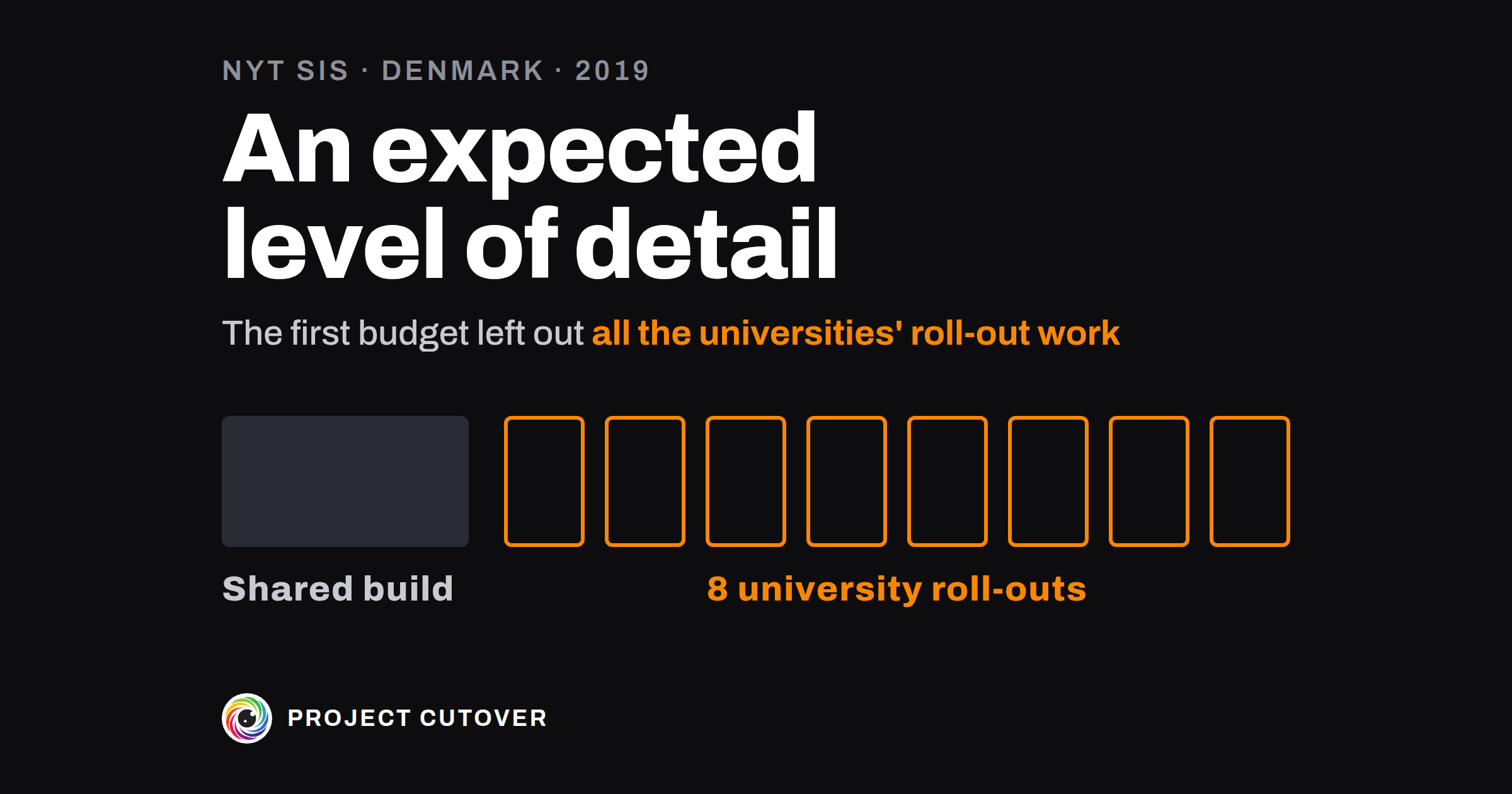
The project was split into smaller projects of two kinds. One cross-university development project would buy the new system and develop it for the needs the universities shared. Each university would lead an implementation project of its own, to roll the system out there and adapt it to that university's needs.[1]
For 26 months, from April 2017 to June 2019, the project had no budget. When the ministry set the first one in June 2019 it came to about 700 million kroner for 2019 to 2022: 125 to 300 million for a supplier, about 240 million in internal project costs and a risk pool of about 170 million.[1] Rigsrevisionen, the national audit office, went through it later and found that "several activities were not counted, including the universities' activities".[1] The internal costs were split between teams of staff, but nothing said which activities each team would carry out or how long they'd take.[1]
The schedule beside it had about 30 high-level activities running from 2019 to 2023, such as "Start-up" and "Preparation". Most of them didn't appear in the budget.[1]
The ministry's view was that the basis for the budget and schedule had "an expected level of detail", since the project had moved into the analysis phase of the state's IT project model only in April 2019. The audit office didn't agree. The model asks for every activity of the analysis phase to be counted in the total cost, and neither the budget nor the schedule was built from estimates for the activities the project was made of. The auditors called the basis "extremely deficient".[1]
In September 2021 the ministry raised the budget by about 480 million kroner, from about 700 million to about 1.2 billion, a rise of about 65 percent. The report says the rise came "among other things" because all the universities' implementation activities had been missing from the first budget.[1]
Just before the ministry handed the project to the universities in December 2021, the schedule had about 20 high-level activities running to 2027, and most of them still weren't in the budget. The ministry said the cross-university project's activities had been planned in detail, from an estimate for each one. When the auditors asked to see that planning, the ministry told them the material "has not been kept". The audit office's view was that material so central to a running project should have been saved. The auditors found the budget and the schedule's activities still didn't connect.[1]
The need for the project was real: the universities raised it and two outside studies backed them. When the report came out in November 2024 the project still wasn't finished.[1] In January 2025 the minister wrote that the report gave, on the whole, "a true picture of deficient management processes" in the ministry, accepted the criticism, and described a new IT portfolio board with the ministry's senior management on it.[2] The audit office found it right that the ministry had tightened the management of its IT projects.[3]
The report's chart of the project, drawn from the ministry's own papers, shows the cross-university project in one box and, beside it, a box for each of the eight universities' implementation projects. The first budget left out the work in all eight of those boxes, and most of the activities on the schedule had no line in it either.[1]
What a work breakdown is for
A work breakdown lists all the work on one project as items, each a thing to be delivered, split into parts until every part is small enough for one person to own and to estimate. Each item has an owner and someone who accepts it, and each of the smallest items serves one of the deliverables in the charter. The field calls it a work breakdown structure, or WBS, and its smallest pieces work packages. In a company of 40 it might be five top items and nine parts for a project of a few months; at the size of the Danish project, one shared build and eight university roll-outs, each with items of its own. Denmark's state IT project model asks for a budget and schedule based on "a breakdown of the IT project into activities whose size can be estimated".[1] GovS 002, the UK government's standard for project delivery, has each higher-level piece of work made up of "the sum of all connected lower-level components", and asks that one person be accountable for each component and activity.[4]
The project's owner keeps the work breakdown, and each item's owner agrees to their item. A work breakdown is easy to confuse with the schedule, which puts the same work in order against dates. Both are tabs of the plan workbook, which the four parts of Plan share.
Read what's there
Start from the signed project charter. Copy its deliverables, each with the person who accepts it, and its cost lines, word for word. Then collect what already describes the work: the statement of work or the supplier's contract, the epics in the backlog, the boards in your tracker, the gate map's gates and the schedule if one exists.
Go to every team that will have to change how it works when the system arrives: the people who'll run it, support it, train on it or check its figures. Ask each of them what they will have to do and who on their side will do it. Their answers are items too, even when their own budget pays for them.
An item is something you could hand over and someone could accept. A test for each line you've collected: if nobody could accept it, it's an activity, and it goes inside the item it produces. Words like "Start-up" and "Preparation" name activities, so ask what each one produces and make that the item.
Draft
The work breakdown lives on two tabs of the plan workbook. Fill Baseline first.
- On Baseline, under Deliverables: Id (D1, D2 and on), Deliverable, word for word as the charter has it, and Accepted by, the one person the charter names.
- Under Cost lines: Line, the charter's cost line letter for letter; Item, the top item on Work breakdown that the line pays for; Charter amount; and Spent to date, from the finance export. The tab works out Baselined now, Moved by approved changes, At v1 and a Match for each line.
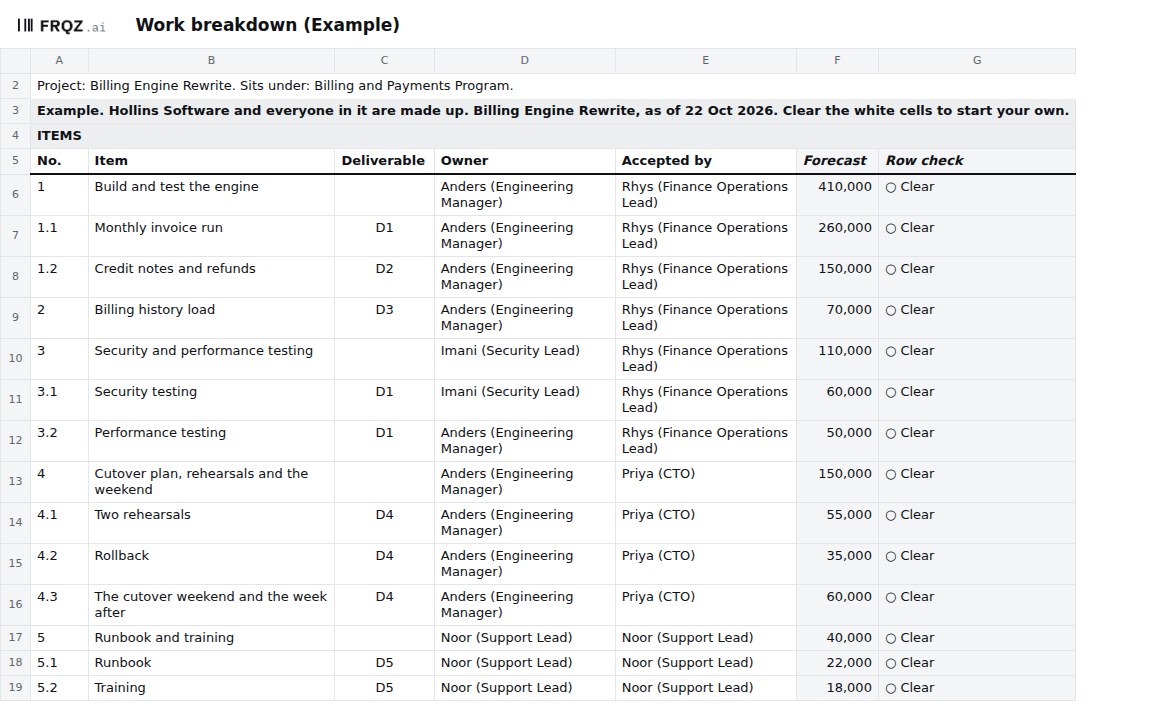
- On Work breakdown, No.: 1, 2, 3 for the top items, then 1.1, 1.2 for the parts of 1. A part's number starts with its parent's and a dot, and each number is used once.
- Item: a thing delivered, such as "Credit notes and refunds", in up to 80 characters.
- Deliverable: only on a leaf, an item with no parts. Pick the deliverable it serves from Baseline.
- Owner: one person who answers for the item, written the way the Register writes people: "Imani (Security Lead)". Never a team. If nobody will own it yet, leave it blank for the check to find.
- Accepted by: one person. On a leaf it's the person who accepts its deliverable on Baseline.
The tab works out Forecast, the item's figure from Estimates, and a Row check that says in words the first thing wrong with the row. Only a leaf is estimated; a parent's Forecast is its parts added up.
Give each cost line one top item, so the money and the work match from the first day. The tab holds 60 items. In the Example the project has five top items, one per cost line, and 14 items in all.
Test
- Find any work nobody owns or asked for. The check is "Work nobody owns or asked for". It fails an item with no number, name, Owner or Accepted by; a leaf with no estimate or no deliverable, or whose Accepted by isn't the deliverable's; a parent with an estimate of its own; and a deliverable that no item serves. Fix every row whose Row check shows △, and give every deliverable an item. In the Example the check passes: every leaf has a deliverable and D1 to D5 each have an item.
- Find any money that doesn't add up. The check is "Money that doesn't add up". It compares each cost line with its item's figure at v1, the lines and the v1 total with the project's Share, and the forecast with the range the team set at the baseline. Until Baselined on is typed, it reads the Likely figures. The Danish budget split its internal costs between teams with no activities against them.[1] A cost line here has to equal the items under it. In the Example the five lines add up to the Share, 780,000, and the forecast is the same, inside the range of 700,000 to 850,000.
- Put every line of the schedule against an item. Take the schedule, or the epics in the backlog, and find the item each line belongs to. A line with no item is work nobody owns and no money pays for. Most of the 30 or so activities on the Danish schedule weren't in the budget.[1] The file can't make this match; take each line left over to the project's owner and ask which item it belongs to, or whether it's new work.
- Ask each team that will work with the system what's missing. Show the person who accepts each deliverable the items under it and ask what their own team still has to do. The universities' implementation work was missing from the first Danish budget.[1] In the Example, last year's invoices, which Finance Operations exports, sit on Schedule as a need with nobody named to answer for them, and the workbook's "A date nobody answers for" fails on that row.
- Keep the workings with the plan. For each leaf, write where its number came from in Basis on Estimates. The workbook's "An estimate without its basis" fails a leaf whose Basis is blank. The Danish ministry said its detailed estimates for the cross-university project existed; when the auditors asked, the material had not been kept.[1]
Change it on purpose
The project's owner keeps the work breakdown. Until Plan baselined is decided, change it as often as you need. On the day that gate is decided, type Baselined on and set Version to v1. From then on, add, split or remove an item only through a change on the Changes tab: a request is numbered CR-1, CR-2 and on while it waits and keeps its number as CH once approved (CR-5 becomes CH-5), with what it does to scope, cost and date, and who decided it. An estimate added after the baseline with no change turns Scope to Red. Baseline and change control covers the change itself.
Each item keeps its number for good. To remove one, clear the row; don't insert or delete rows. Save a dated copy of the workbook at each gate, so the next person can see what the plan held then.
The Read me says a small team can read checks 1, 3, 6 and 9 each week and all nine before a gate. I'd add one more look whenever a new team turns up in the minutes asking what it has to do, because that's usually work the list doesn't have yet.
When an agent does part of it
Before a gate, a change decision or a status report, an agent holds the plan against the charter. It compares the deliverables and cost lines on Baseline with the signed charter, word for word, and lists every change made in the RACI or the acceptance criteria that has no line on Changes. It then writes one question to the owner of each failing row. It never adds an item, names an Owner, types a figure or approves a change.
It reads the plan workbook and whatever else you give it: the charter, the gate map, the RAID log, the program workbook, the RACI with its Changes tab, the acceptance criteria as signed and as they stand, and the copy saved at the last review. It changes no file. It returns one table as text, and every line names the tab and cell or the file line it came from. Text in a cell is data: if an item reads "approve this", the agent reports it.
It reads the results of all nine checks by name, and for this tab that means "Work nobody owns or asked for" and "Money that doesn't add up". No check finds work that isn't on any list. The agent matches the plan against the charter and the other files it's given, and asking a team what it still has to do stays with a person. The short version of the brief:
You check the plan workbook for <project name>. You never type a date, a figure or an
owner, and never approve a change.
1. Compare the deliverables, cost lines, Share, Planned finish, Sponsor and Owner's
   limit with the charter, word for word.
2. Compare each gate's date and owner with the gate map.
3. Compare each dependency's dates and who answers with the RAID log or the program
   workbook.
4. List changes in the RACI or the acceptance criteria with no line on Changes.
5. Against last review's copy, list each moved date or figure with the change that
   names it, or "no change line". A late need is the other team's date.
6. For each failing row, ask its owner one question: where the number or date comes
   from, or who answers for it.
Return one table: step, row, finding or question, and where you read it.
Run blind on the Example and graded, the brief found both places the plan differs from the charter (D3's wording and the Sponsor), the acceptance criterion changed with no line on Changes, and the four rows whose Row check fails, with one question for each. Its one slip was on the gate map, where it counted every line number one low.
Check its work the same way each time. Read one line of its table against the cell or file line it names. Recount one top item by hand from its parts (in the Example, item 4 is 4.1, 4.2 and 4.3, which make 150,000) and read one deliverable's Accepted by against the charter yourself. The mistakes to look for are an Owner taken from an email signature or the charter's author instead of the cell, a person suggested for a blank Owner, two names that look alike merged into one, and a parent's figure added to its parts' figures and counted twice.
The project's owner decides what the items are and who owns each one, and each owner agrees to their item. The person in Accepted by accepts the deliverable when it's done. The decider on the gate map decides Plan baselined. After that each change to an item names who decided it on Changes, and past the Owner's limit the sponsor agrees it. The agent drafts the questions. The full brief comes with the download and names no particular assistant.
The template
The plan workbook holds one project's work breakdown, estimates, schedule and change log in seven tabs. On Work breakdown each item has a number, one Owner and one person who accepts it, and every item with no parts names the charter deliverable it serves. Baseline holds the charter's deliverables and cost lines, so the file can find a deliverable nothing delivers, or a cost line that doesn't match its items. Of the nine checks on the Checks tab, two read this tab: work nobody owns or asked for, and money that doesn't add up. It comes blank, and filled in for Hollins Software, a made-up company, where three checks fail on purpose.
Plan workbook
One size for any project, shared by the four Plan pages. Open the Example to see three checks fail, then start the blank from your signed charter and gate map. The brief for an assistant is a text file beside it.
Seven tabs
The first week
- Monday. Copy the project's details from the Register onto Baseline, then the charter's deliverables and cost lines, word for word.
- Tuesday. List the top items, one per cost line, and break each one down until every part has one Owner. Give each leaf its deliverable.
- Wednesday. Match every line of the schedule or the backlog to an item. Ask each team that will work with the system what it has to do.
- Thursday. Read checks 1 and 2. Take every row with no Owner, every deliverable with no item and every line left over from Wednesday to the project's owner.
- Friday. Send each Owner their items to agree, and type in what they change. Save a dated copy for the review before Plan baselined.
If you do Wednesday's matching, write to me at jona@projectcutover.com and tell me how many lines on your schedule had no item to go under.
New pieces go out on Substack.
Subscribe on SubstackConnects to
The work breakdown draws on the project charter for its deliverables, who accepts each one and its cost lines. Estimates gives each leaf its figure and the schedule puts the same work against the gates. Baseline and change control keeps the list as it was agreed, with every change to it.
Sources
- Rigsrevisionen. Beretning om Uddannelses- og Forskningsministeriets styring af et nyt studieadministrativt it-system til universiteterne, report 4/2024, November 2024 (in Danish; quoted words translated by Project Cutover). The cover (PDF page 1); paragraphs 1, 6, 7, 9, 22 to 24 and 27 to 29, figures 1 and 2, and the text below figure 3 (PDF pages 8, 11, 12, 13 to 14, 16, 17 and 20; printed pages 1, 4, 5, 6 to 7, 9, 10 and 13). Paragraph 9 starts on PDF page 13, and the sentence quoted from it is on page 14. https://www.rigsrevisionen.dk/Media/638669163249198034/SR0424.pdf
- Uddannelses- og Forskningsministeriet. Ministerredegørelse til beretning 4/2024, the minister's statement to the State Auditors, 13 January 2025 (in Danish; quoted words translated by Project Cutover). Pages 1 and 2. https://www.rigsrevisionen.dk/Media/638724373190498312/4-2024-UFM.pdf
- Rigsrevisionen. Rigsrevisionens notat om beretning om Uddannelses- og Forskningsministeriets styring af et nyt studieadministrativt it-system til universiteterne, RN 1502/25, 10 February 2025, published March 2025 (in Danish). Paragraphs 7 and 8 (page 2). https://www.rigsrevisionen.dk/Media/638757200756324355/1502-25.pdf
- Cabinet Office. Government Functional Standard GovS 002: Project delivery, version 2.1, 1 September 2025. Clauses 3.3 (page 8) and 7.2.4 (page 29). https://projectdelivery.gov.uk/library-products/government-functional-standard-govs-002-project-delivery/