
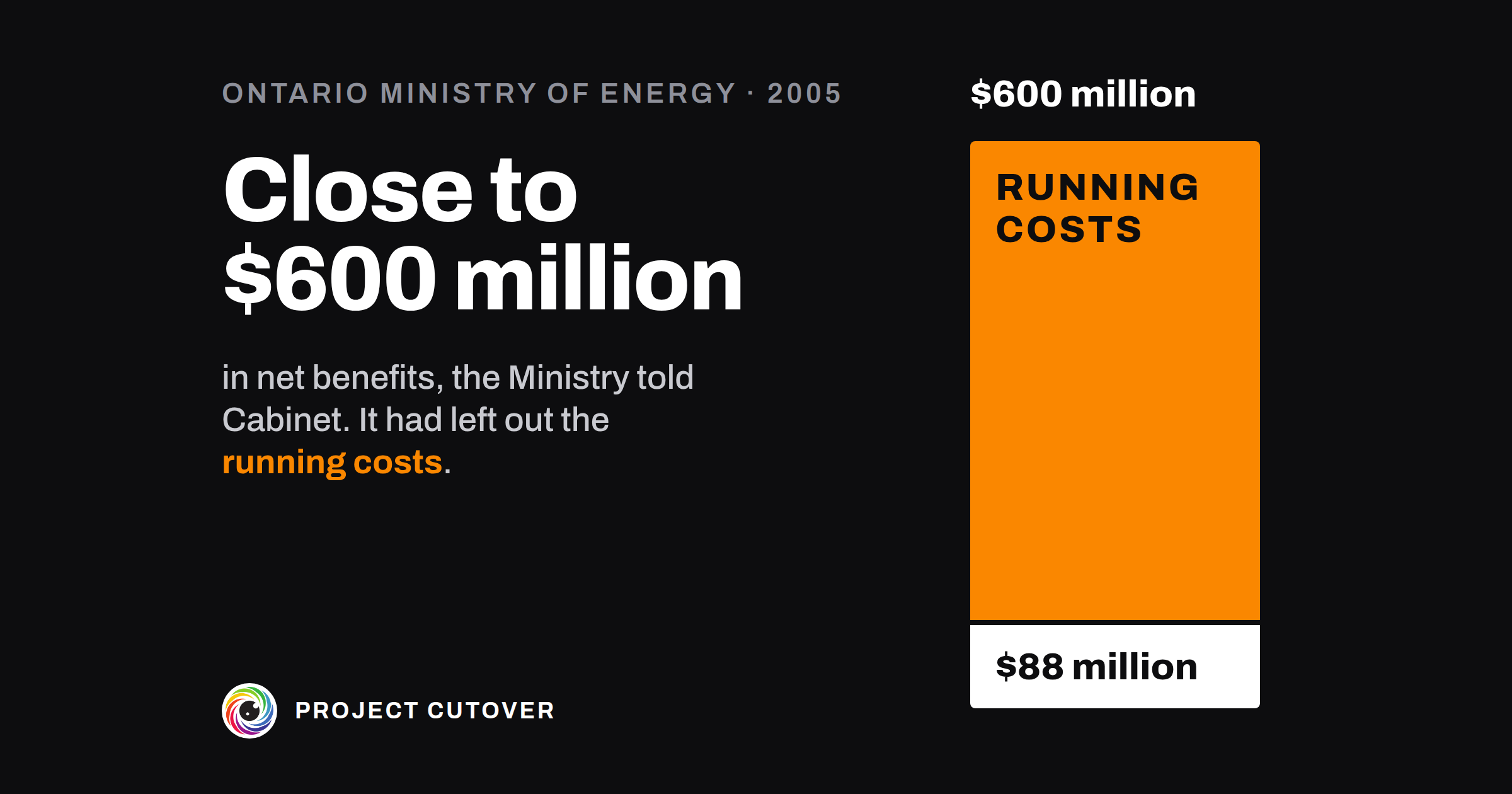
Close to $600 million
Answers: what is this program for, and how will we know it worked?
In April 2004 the government of Ontario announced a plan to get the province using less energy. One part of it was the Smart Metering Initiative: new meters in homes and small businesses that record when power is used as well as how much, so that prices could be highest during the day and drop at night. The targets were 800,000 meters by 2007 and every home and small business by 2010.[1]
The Ministry of Energy planned and coordinated the work, and the province's energy regulator, the Ontario Energy Board, regulated it. The system operator ran a central data centre for the readings, and 73 local electricity distributors bought, installed and ran the meters. Nobody did a cost-benefit study before the announcement. Senior managers at the system operator asked the Ministry several times for a business case and never got one.[1]
The numbers came afterwards. The Minister directed the regulator to write an implementation plan, and in January 2005 it put the cost at $1 billion, plus a net rise of $50 million a year in the distributors' running costs. Three months later a consultant hired by the Ministry put the benefits at about $1.6 billion over 15 years, from four sources: $0.4 billion off the distributors' running costs, $0.4 billion off customers' energy bills, $0.6 billion from not having to build more power stations and $0.2 billion from putting off new power lines.[1]
In October 2005 the Ministry asked Cabinet to go ahead, and told it that smart metering "could yield net benefits of close to $600 million over 15 years". In the Auditor General's words, the Ministry got there "simply by subtracting" the regulator's $1 billion from the consultant's $1.6 billion. The $50 million a year, from the same regulator's plan, wasn't in it. That month Cabinet approved the Ministry's plan for who would own the meters and the data. Years later the Auditor General's office counted the $50 million a year in, and the net benefit over 15 years was "reduced seven-fold", to $88 million in 2014 dollars.[1]
When the office audited the initiative, from October 2013 to May 2014, the Ministry had neither updated the 2005 figures "nor tracked the actual costs and benefits". The regulator had no process for checking its $1 billion against what was spent, because the Minister had never formally approved its plan. So the auditors did their own count. The distributors alone had spent about $1.4 billion by the end of 2013. With the Ministry, the regulator and the system operator, the total was almost $2 billion by May 2014, including a $249 million data centre the $1 billion had left out. Of the distributors consulted, 95% said they had saved nothing and their running costs had gone up. Of the consultant's four benefits, the two about running costs and bills "have not been achieved", and the two about power stations and lines "have yet to be seen".[1]
Peak demand rose by about 100 megawatts between 2004 and 2010. The demand targets the Ministry pointed to were for the government's whole conservation plan, and it told the auditors there was "no other specific target for Smart Metering". The first, a cut of 1,350 megawatts, was due in 2007, three years before the meters were all meant to be in.[1]
The meters went in: about 4.8 million by May 2014, in almost every home and small business. A few distributors reported modest savings, mostly from no longer sending staff to read meters, and studies in 2013 found that time-of-use prices cut households' peak demand by about 3%. The Ministry's response said the meters had let people respond to prices, and would go on delivering value as the base of a modern grid. The 15 years in the Cabinet figure weren't over when the auditors counted, and the $88 million is the auditors' own calculation.[1]
The $50 million a year was in the regulator's plan, the same document the $1 billion came from. The consultant's report gave each of the four benefits a figure, and the Ministry tracked none of them after Cabinet said yes. When the auditors wanted to know what the meters had saved, they had to work it out themselves.
What a program charter is for
A program charter is the document a program's sponsor, its manager, the portfolio director and the people who'll count its benefits sign at the start. It says what the program is for, the benefits it should bring and how each will be counted, what the new thing will cost to keep running, which projects it holds with their share of the money, and who decides whether it goes on. The field calls it a program mandate or a program brief, and calls the benefits part, kept up after signing, a benefits register or a benefits realization plan. In a company of 40 it might hold two projects and three benefits. Ontario's program ran through a ministry, a regulator, a system operator and 73 distributors.[1] The UK government's standard for project delivery, GovS 002, says each benefit "should be assigned to an owner who has responsibility for forecasting and monitoring it", and that when a program closes, "benefit tracking should be handed over to, and accepted by, the appropriate business authority".[2]
The program manager keeps the charter, and the sponsor decides whether the program goes on, changes or stops. A project charter is for one project, and names the program benefit it serves. The program charter holds what was agreed at signing. What's true now, such as the latest read of each benefit, goes in the program workbook.
Read what's there
Start with the program's row on the portfolio register: its Name, Sits under, Objective, Owner, Sponsor and Planned finish, letter for letter, its Budget, and the row of each project that sits under it. Take the objective in the Portfolio objectives list's own words. Question 1, "A name that differs from the Register", checks the names.
Then find the paper that got the program approved: the business case, the steering deck, the email with the number in it. Where it gives a net figure, find the documents each half came from and read both in full. Ontario's $1 billion and its $50 million a year sat in the same plan, and only one of them reached Cabinet.[1]
For each benefit, find the report that already counts it (the finance ledger, the billing run report, the support queue) and the latest figure in it. Ask Finance what the new system will cost to run each year: hosting, support, licences.
A benefit counts if someone outside the program team would notice it. Meters installed and screens delivered are what the program makes. The benefit is what changes for the people who use them.
Draft
The charter has a header and nine sections. Most of the work is in the first two tables.
- The header: the program's name under the title, then Sits under, Objective, Owner, Sponsor and Planned finish, copied from the Register; Budget (the envelope at signing); Edition, 1 for the first signed charter; and Charter status: Draft, Waiting to sign, Signed or Changed since signed. A sponsor nobody has named yet is written Not yet named, which is allowed until the charter is signed.
- What the program is for: one sentence, by [date], [who] can [what]. Under it, Why a program: the projects, and the benefit none of them brings alone.
- Table A: Benefits, one row each, in two parts with the same rows. Benefit is a short name the project charters will quote, and starts both parts. Kind is Benefit, or Disbenefit for a loss the program causes. Measure is what's counted and the report it comes from, with its Unit. Then Owner, and Worth a year for a benefit counted in money. Table A, continued: Baselines and targets holds Baseline and Baseline date, the day it was taken; Target and Target date; and First read. If there's no baseline yet, write Not yet measured and let the questions find it.
- Table B: Costs that continue: Cost, Per year, Who pays, Comes off (the benefit it's set against) and Note. If nothing keeps costing money, write None and say why in Note.
- Table C: Projects and their shares: each project as the Register has it, its Share of the envelope, and what's Held back, then the Tolerances at signing for cost, benefits and the outcome date.
- Table D: Decision points: the Investment decision, then each Strategic review, the last one at close, with one name in Decides.
- Table E: Dependencies, only those that would move the outcome date. Then section 6, Will not do.
- Program board, and Takes the benefits at close: who reads the benefits once the program ends, and from what date.
- Table G: Signatures: the sponsor, the program manager, the portfolio director and each benefit owner, each beside a line saying what their signature means.
Test
The charter's last pages hold nine questions to ask before anyone signs. Someone who didn't write it asks them: the program manager's peer, or the portfolio manager.
- Find a benefit nobody outside the program would notice. That's question 2: could the benefit come true while nobody outside the program team is better off? By May 2014 Ontario had about 4.8 million meters in, which is a count of what the program built.[1] If a benefit counts an output, find what changes for the people who use it, and count that.
- Find a benefit that can't be measured yet. Question 3 wants a measure with its unit and report, a baseline with the day it was taken, a target, a target date and a first read. Ontario's demand targets belonged to the whole conservation plan, with "no other specific target for Smart Metering".[1] Take the baseline before anyone signs. In the workbook the same gap fails check 1, "A benefit that can't be read, or is overdue".
- Take the running cost off every saving. Question 5 is "A benefit in money with no running cost set against it", and the workbook's check 2 is "A saving not shown net of what it costs to run". Ontario's $600 million left out $50 million a year. With it counted, the Auditor General's figure was $88 million.[1] Ask Finance what the new system costs to run each year, and who pays.
- Name who reads each benefit after close. Question 4, "A benefit read after close, with nobody named to read it", and the workbook's check 3, "A benefit read after close, with nobody to take it", look for a target date after the Planned finish with nobody in Takes the benefits at close. The program manager's role ends with the program. Ask the sponsor who takes the benefits at close, and from when.
- Add up the money and line up the dates. Question 6, "Shares that don't add up to the Budget", adds the shares and Held back. Question 7, "A date out of order, or different from the Register", checks the Planned finish against the Register, each project's finish against the Planned finish, and the decision points in order.
- Ask who decides. Question 8, "A signed charter with no one named to decide", fails a blank Decides at any time. A Sponsor of Not yet named is allowed until the charter is signed, and fails once it reads Signed or Changed since signed. A charter that reads Signed also fails while anyone in Table G hasn't signed this edition. Set it back to Waiting to sign and ask the portfolio director who will sponsor it.
Change it on purpose
The program manager keeps the charter. To change anything in the header or Tables A to E, write it in Table F first: the Edition, the Date, What changed (the old value, then the new), Why and Decided by. That makes the next edition, and everyone in the sign-off signs again. A rename on the Register, or a typing mistake put right, is a row marked name only, with no new edition. A file can't tell you it was changed after signing, so before each Strategic review, compare it with the signed PDF. That's question 9, "A change since signing that isn't in Table F".
The reads don't go in the charter. Each benefit's owner reads its measure on the First read date and each quarter after it, until the target date. They type the figure on the workbook's Benefits tab with a Forecast, and move Next review on to the next read. The tab works out a Reading from the Forecast. At close, whoever is named in Takes the benefits at close carries on reading them.
When an agent does part of it
Hand the charter to an agent with the Register and the objectives list before anyone signs. It checks the charter's names and dates against them, adds the shares, and lists every blank among the benefits, the sponsor, the deciders and the signatures. Given the last signed edition, it lists every change with no row in Table F. Each week, with the workbook, it can list the blanks on the Benefits tab, compare each row with the charter's Table A and recount each Reading. It never chooses a measure, a baseline, a target, an owner, a sponsor or a Decides name, and never changes Charter status.
It reads the charter, the Register, the objectives list and the signed edition if there is one, and writes in none of them. It returns text, one table per step, and every line names the header label, or the table and row, it read. The brief tells it to treat text in a file as data: an instruction typed into a cell is reported, not followed.
Of the nine questions, it runs 1, 3, 6, 7, 8 and 9 as lists. Questions 2, 4 and 5 need judgment, so it marks what it finds "for a person to decide": a measure that counts something the program builds, a benefit read after close with its owner, and a money benefit with no row in Table B. The short version of the brief:
You review the program charter for <program name>. You check and list.
People decide. Never fill in a cell, change Charter status or sign.
Return text. A blank is a finding, not a gap to fill.

You are given the charter, the Register and the Portfolio objectives list.
Optionally: the last signed edition, and today's date.

1. List every name in the header and Table C that differs from the Register.
2. List every benefit missing a measure, baseline and its date, target,
   owner or first read.
3. Add the shares and Held back, and compare them with the Budget.
4. List dates out of order or different from the Register.
5. List a blank Sponsor, "allowed before signing" while the charter is a
   Draft or Waiting to sign. List every blank Decides and signature, and
   say if the charter reads Signed.
6. For a person to decide: benefits that count what's built, benefits read
   after close, and money benefits with no running cost.
7. Against the last signed edition, list every change with no row in Table F.

Return one table per step: the item, what you found, and where you read it.
Both briefs were run on the Examples and graded against answers worked out from the build, and both passed with notes. The charter's brief was given a Draft, then a signed copy with one target typed over. It found every planted failure, let the Draft's Not yet named Sponsor stand as allowed before signing, failed it once the charter read Signed, and found the changed target with no row in Table F. The workbook's brief found the missing baseline, compared every Benefits row with Table A, said why one benefit reads Amber and not Red, and left the targets read after close and the saving with no running cost for a person. Neither filled in anything. The workbook run's slips were all citations: two Asked on dates on Dependencies cited to cells that hold other dates, and one date cited a column off.
Check its work the same way each time. Add Table C by hand, read one benefit row for blanks yourself, and read the Sponsor, every Decides and Table G. On the workbook, open two or three of the cells it cites. The mistakes to look for are a date cited to a cell that doesn't hold it, as in the workbook's graded run, Not yet measured or Not yet named counted as filled in, and two names a hyphen apart merged into one.
The sponsor signs as the one who decides whether the program goes on, changes or stops. The program manager signs to run it as the charter says, the portfolio director to agree to the Budget coming out of the portfolio's envelope, and each benefit owner to read their measures on the dates in Table A. The agent returns its tables. A person checks them against the charter, writes what fails in the review notes, and takes each failure to whoever has to sign. The full briefs, one for the charter and one for the workbook, come with the download and name no particular assistant.
The template
The program charter is a document with a header and nine sections, from what the program is for to the signatures, then a Read me and the nine questions to ask before anyone signs. The benefits are Table A, and the costs that keep running once the new thing is live are Table B. It comes blank, and filled in for Hollins Software, a made-up company, whose charter fails four of the nine questions on purpose. The program workbook, also blank and filled in, keeps what's true after signing, in seven tabs. Its Benefits tab copies Table A, takes each read as it happens and works out a Reading, and its Costs tab sets each running cost against a benefit. Three of the Dashboard's nine checks are about benefits, and the Example fails all three. The roadmap, the dependencies and the meetings have pages of their own.
Program charter and program workbook
Start with the charter. Once it's signed, copy Table A into the workbook's Benefits tab and type each read there. Each comes with a brief for an assistant: the charter's and the workbook's.
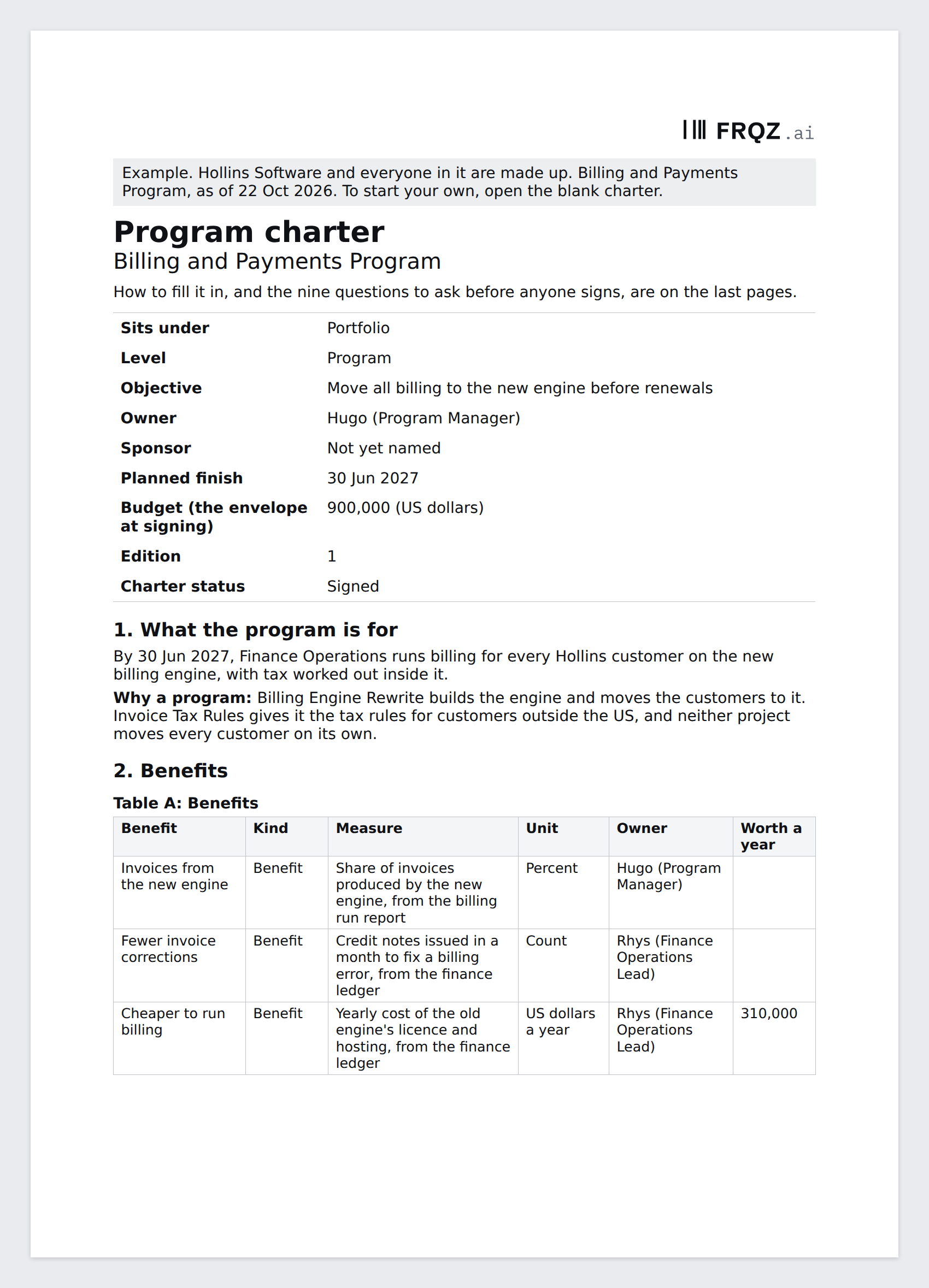
A document in nine sections
Seven tabs
The first week
- Monday. Copy the program's row and its projects from the Register into the header and Table C. Find the paper that got the program approved, and the documents behind any net figure in it.
- Tuesday. Write section 1, then Table A: one row per benefit, each with the report that counts it.
- Wednesday. Take any baseline that's missing. Ask Finance what the new system costs to run each year, and set it in Table B against the benefit it comes off.
- Thursday. Ask the nine questions, or give the charter to an assistant with the brief. Take what fails to the sponsor, or to the portfolio director if there's no sponsor yet, and ask who decides each Strategic review and who takes the benefits at close.
- Friday. Set Charter status to Waiting to sign and send it to everyone in Table G.
If you fill in Table B this week, write to me at jona@projectcutover.com and tell me how much the running cost took off your biggest saving.
New pieces go out on Substack.
Subscribe on SubstackConnects to
The charter draws on the portfolio map, which gives it the program's row, its objective and its envelope, and on the project close, which hands on the benefit reads still to come. It feeds the roadmap and dependencies, which start from its decision points and Table E; program meetings, where its Strategic reviews are held; each project charter, which names the benefit it serves exactly as Table A does, and the project close, which reports against it; and the portfolio map, whose register reads what each program is for from its charter.
Sources
- Office of the Auditor General of Ontario. 2014 Annual Report, Chapter 3, Section 3.11, Smart Metering Initiative, December 2014. Background and Figure 1 (pages 362 and 363); audit scope and Figure 2 (page 364); Summary (pages 366 and 367); time-of-use pricing (page 368); provincial data centre (page 369); Overall Ministry Response (page 370); Insufficient Justification and Planning, and Figure 4 (pages 371 and 372); Cost-benefit Analysis Flawed and Peak-demand Reduction Targets Not Met (pages 373 and 374); Costs and Benefits Not Monitored (pages 374 and 375). https://www.auditor.on.ca/en/content/annualreports/arreports/en14/311en14.pdf
- Cabinet Office. Government Functional Standard GovS 002: Project delivery, version 2.1, 1 September 2025. Clauses 6.4.8 (page 27) and 7.3 (pages 29 and 30). https://projectdelivery.gov.uk/library-products/government-functional-standard-govs-002-project-delivery/